



How to Gift Frost Stars in Whiteout Survival – Send to Friends Fast & Safe

2026-05-29 17:17:12
Hey fellow survivors! If you play Whiteout Survival, you know how tough the frozen wasteland can be. Sometimes the best way to help your alliance mates, surprise a friend, or show appreciation to your squad is by gifting them Frost Stars. It’s one of the most thoughtful gestures in the game.
In this guide, I’ll walk you through everything step by step — from whether gifting is possible to the exact process that actually works. I’ve based this on real player experiences and official methods so you can do it safely and quickly.
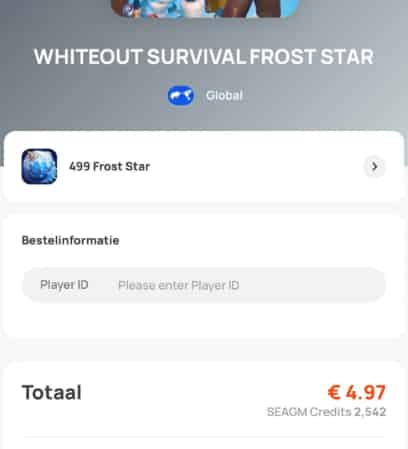
▍Can You Send Gifts to Friends in Whiteout Survival?
Yes, you can!
While there isn’t a direct “gift specific item” button like in some other games, Frost Stars serve as the perfect flexible gift. They act like cash in the game — the recipient can use them to buy any pack or deal they want in the shop.
This is way better than guessing what they need. Whether they want hero shards, speed-ups, gems, or a big monthly card, Frost Stars give them full freedom. Many alliance leaders and close friends use this method to support each other during tough events like SvS or big rallies.
▍What Are Frost Stars in Whiteout Survival?
Frost Stars are the premium token in Whiteout Survival. Think of them as real-money equivalents inside the game:
- 1 Frost Star ≈ 1 cent USD (for example, 999 Frost Stars = roughly $9.99 value).
- They can be used to purchase any packs and deals directly in the in-game shop.
- When you buy them from the official store, they’re delivered safely via in-game mail.
They’re especially popular for gifting because the receiver gets complete control over how to spend them.
👉 Read more: Whiteout Survival Frost Star: Everything You Need to Know
▍How to Gift Frost Stars in Whiteout Survival?
Here’s the complete, up-to-date process that works in 2026.
Step 1: Get the Recipient’s Player ID
This is the most important part — and the one people mess up most often.
- Ask your friend to open Whiteout Survival.
- Have them tap their avatar in the top-left corner.
- Their Player ID (a string of numbers) will appear under their name.
- They just need to copy it and send it to you (via Discord, WhatsApp, in-game chat, etc.).
Pro tip: Double-check the ID before paying. Even one wrong digit and the Frost Stars go to the wrong person.
Step 2: Go to the Official Store
- Visit the official Whiteout Survival top-up store: https://store.centurygames.com/wos (or search “Whiteout Survival official store”).
- Enter the recipient’s Player ID (not yours!).
- Choose the Frost Stars pack you want to gift (there are various amounts from small to large).
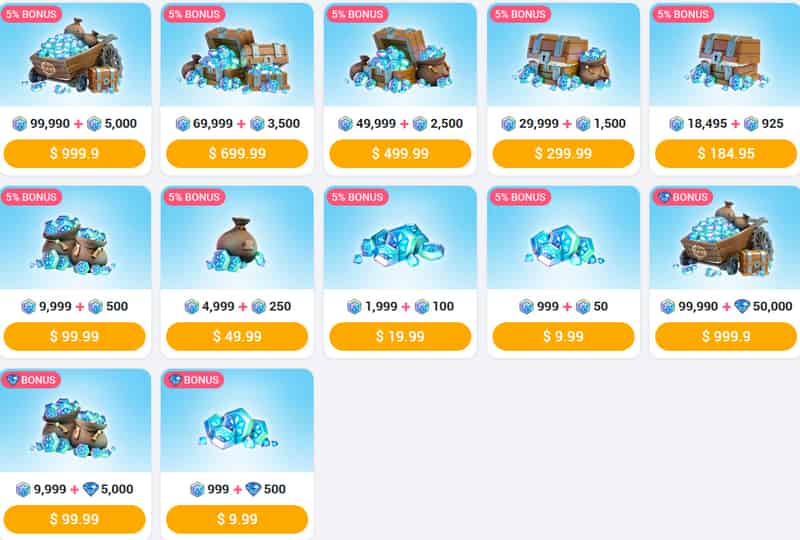
- Complete the payment using your preferred method (cards, PayPal, etc.).
- Once the purchase is successful, the Frost Stars will be sent to the recipient via in-game mail.
It usually arrives within a few minutes, but sometimes it can take up to 30 minutes depending on server load.
Step 3: How the Recipient Claims Them
- Open the game and check the mailbox (envelope icon).
- Find the Frost Stars reward and claim it.
- Go to the in-game shop — they can now spend the Frost Stars on any packs they like.
That’s it! The whole process usually takes under 5–10 minutes.
▍Bonus Tip: Where to Top Up Frost Stars Cheaply
If you want to top up Whiteout Survival for your own account (or the recipient wants to buy more later), third-party sites like TOPUPlive are popular options. They often provide Frost Stars and packs at more affordable prices with convenient local payment methods. Many players use them for personal top-ups to stretch their budget further while enjoying the game.
👉Read more: Whiteout Survival Packs Guide: Types, Best Packs, Prices and More
▍Safety Tips for Gifting
- Always use the official store for gifting.
- Never share your own login credentials with anyone (and don’t ask others for theirs).
- Double-check the Player ID twice before confirming payment.
- Be cautious of anyone offering “free Frost Stars” — those are almost always scams.
- If something goes wrong (rare, but possible), contact the official support with your receipt.
▍Frequently Asked Questions
1. How do you send Frost Stars in Whiteout Survival?
Go to the official store (store.centurygames.com/wos), enter the recipient’s Player ID, select a Frost Stars pack, and complete payment. The stars arrive in their in-game mail.
2. How to buy Frost Stars for someone else?
Use the official top-up website and input their Player ID instead of your own. This is the standard and safest way to gift.
3. Can the recipient see who sent the Frost Stars?
Usually not directly, but they’ll know someone cared enough to send them!
4. Do Frost Stars expire?
They don’t have a strict expiration, but it’s best to use them during events when you can get the most value.
5. Can I gift a specific pack directly?
Not really — Frost Stars are the flexible alternative that lets them choose exactly what they need.
▍Conclusion
Gifting Frost Stars in Whiteout Survival is straightforward, safe, and one of the best ways to support your friends and alliance in the frozen wasteland. Whether you go the official User ID route for quick, no-fuss gifting or choose a trusted third-party top-up site like TOPUPlive for extra value, you’re giving your squad a real edge.
Ready to make someone’s day? Grab the recipient’s User ID, head to the official store, and send those Frost Stars — or reach out to a secure platform if you want the best possible deal on direct packs. Stay safe, keep surviving, and enjoy helping your team thrive!
Lucy Lauria
Game writer
I spend most of my time exploring game worlds, testing new features, and learning how different systems work. Through my writing, I aim to share useful insights, helpful strategies, and clear guides that make games more enjoyable for everyone.


Related News

Last War Survival Top Up: Best Way to Buy Packs, Diamonds, and Gift Codes
Last War Gold Bricks Guide: How to Get, Use, and Buy Gold Bricks Safely
Best Last War Packs to Buy: Complete Guide + Where to Get Them Cheaper
5 Best Last War Survival Top-Up Centers: Where to Get the Best Deals and Secure Recharges
AFK Journey Marene Guide: Skills, Best Teams, Build & Is She Worth Pulling?
Arena Breakout Season 14 Preview: C2S0 Release Date, New Contents and More
Honor of Kings 11th Anniversary Guide: Rewards, Free Skins, and Events
AFK Journey Baden Guide: Skills, Best Teams, Build & Is He Worth Pulling?


