



VALORANT Gifting Guide: How to Gift Skins, Bundles & VP to Friends

2026-09-18 17:01:45
Want to surprise your duo with a new skin, celebrate a rank-up, or just treat a friend? Riot finally added a proper gifting system to VALORANT. Here’s everything you need to know about how it works, the requirements, step-by-step instructions, and common restrictions.
Ready to start gifting? Top up VP instantly and cheaply on TOPUPlive.



475VP

1000VP

2050VP

3650VP

Can You Gift Someone in VALORANT?
Yes. You can gift certain items directly from the in-game store to friends on the same game shard.
What you can currently gift:
- Featured Store bundles (or individual items from those bundles)
- Current VCT / Esports store capsules and bundles (usually as complete packs)
- Valorant Points (VP) — PC only
What you cannot gift:
- Skins or items you already own in your collection
- Daily Store or Night Market items
- Battle Pass
- Radianite Points or Kingdom Credits
- Content the recipient already owns (the system blocks duplicates; bundle prices adjust automatically if they own some items)
Gifting is a one-way purchase for someone else — it is not a trading system.
Valorant Gifting Requirements & Eligibility
Before you can send (or receive) a gift, both players must meet these official rules:
- The gifter’s account must be at least level 15.
- Both players must have been friends for at least one week (7 days).
- Neither account can be serving a long or permanent ban.
- Both players must be on the same game shard (NA, LATAM, BR, EU/EMEA, KR, or AP).
- Extra regional restrictions apply in some countries (e.g., players in the Philippines, Indonesia, Thailand, and Vietnam can only gift within that group; similar limits exist for Turkey, Russia, Ukraine, Iran, Egypt, etc.).
- You cannot gift an item the recipient already owns.
- Daily limit: up to 10 gifts per day.
- VP gifting is available only on PC. You cannot gift VP from your existing balance — you must purchase new VP to send.
These rules help prevent abuse and fraud.
How to Gift Skins (and Bundles) in VALORANT – Step-by-Step
- Open the Store tab in VALORANT.
- Select a Featured Store bundle (or an eligible Esports/VCT item).
- Click the Gift button (usually in the bottom-right corner).
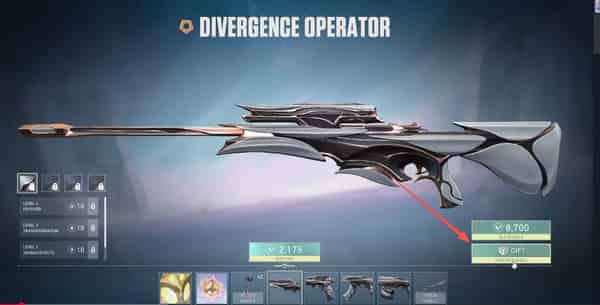
4. Choose your friend from the list (only eligible friends will appear).
5. Select whether you want to gift the full bundle or individual item(s).
6. Confirm the adjusted price (it will drop if they already own part of the bundle) and complete the purchase.
The gift is sent immediately. Your friend will see a notification the next time they log in and can Accept or Reject it.
How to Gift Valorant Points (VP) On PC
you can also gift VP packs:
- Click the VP icon near your balance.
- Select a VP pack amount.
- Click the Gift option next to the price.
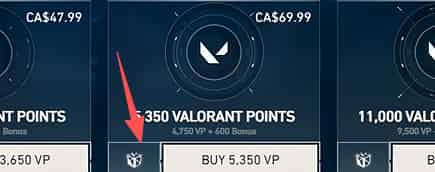
4. Choose an eligible friend and complete the payment.
How Long Does VALORANT Gifting Take?
- Sending is nearly instant.
- The recipient can accept or reject the gift the next time they log into the game.

- If the gift is not accepted within 60 days, it automatically expires and the VP is refunded to the sender.
- Once accepted, the items become permanent on the recipient’s account (normal refunds are generally not available afterward, except where required by local law).
Why Someone Might Be Ineligible + Bans & Anti-Abuse Rules
Common reasons a gift fails or a player shows as ineligible:
- Account is under level 15 (gifter only)
- Friendship is less than 7 days old
- Different game shard or restricted region
- Active long/permanent ban on either account
- Recipient already owns the item
- Daily gift limit reached
- Attempting to gift non-eligible content (Night Market, owned skins, etc.)
Riot designed the friendship duration, level, region, and daily limits specifically to reduce abuse, account farming, and unwanted mass gifting. If you meet every requirement and still cannot send a gift, contact Riot Support directly.
Need VP for Gifting? Top Up VP Easily on TOPUPlive
To gift skins or VP packs you need Valorant Points. TOPUPlive offers fast, secure, and discounted Volorant top-ups.
Current TOPUPlive Valorant VP Prices (USD):
VP Amount | Original Price | TOPUPlive Price | Discount |
|---|---|---|---|
475 VP | $4.99 | $4.70 | -6% |
1,000 VP | $9.99 | $9.20 | -8% |
2,050 VP | $19.99 | $18.40 | -8% |
3,650 VP | $34.99 | $31.87 | -9% |
5,350 VP | $49.99 | $45.51 | -9% |
11,000 VP | $99.99 | $90.62 | -10% |
>>Check live Valorant top up options on TOPUPlive:
475VP
1000VP
2050VP
3650VP
👉See also: Is TOPUPlive Legit?
Important note: This TOPUPlive recharge service currently supports players from Malaysia, Indonesia, the Philippines, Thailand, and Singapore only. Please select the correct region and enter your full Riot ID + Tag when purchasing.Simply choose the amount you need, complete the payment, and the VP will be delivered instantly to your VALORANT account so you can start gifting right away.
Conclusion
- Always double-check that your friend is eligible before purchasing.
- Gifting is currently limited to Featured and Esports content (plus VP on PC). Riot has said more options may come in the future.
- You still cannot transfer or trade skins you already own — gifting only works through new store purchases.
That’s the complete current guide to VALORANT gifting. Surprise your squad, celebrate a win, or just make a friend’s day — the feature is ready when you are.

Lucy Lauria
Game writer
I spend most of my time exploring game worlds, testing new features, and learning how different systems work. Through my writing, I aim to share useful insights, helpful strategies, and clear guides that make games more enjoyable for everyone.
Related products
Related News

Honor of Kings Gifting Guide: How to Gift Skins & Boost Nobility
Once Human Gifting Guide: How to Gift Cosmetics, Blueprints & Items
Once Human Version 3.0.6 Update: Beast Riding, Server Merges, Isles of Abyss & More
PUBG MOBILE Ocean Odyssey Guide: Back to the Deep
Foundation: Galactic Frontier Season 2: The Usurper – Release Date, Story, Features & Events
Sausage Man SS25 Season Update: Create & Destroy Release Date, New Weapons, Season Pass & More
Delta Force Loot Guide: Valuable Items and Loot Priorities
Arena Breakout: Infinite Season 7 Weapon Tier List: Which Guns Should You Use?


