



Once Human Gifting Guide: How to Gift Cosmetics, Blueprints & Items

2026-09-18 17:32:56
Gifting in Once Human lets you share cosmetics, base blueprints, and certain items with friends, though the methods differ by item type. Shop cosmetics can be gifted directly at purchase, blueprints support dedicated sharing and gifting features, while most inventory items (weapons, materials) rely on trades or storage permissions. This guide covers every major gifting system, requirements, limitations, and troubleshooting tips so you can send gifts smoothly.
Ready to gift premium cosmetics? Make sure you have enough Once Human Crystgin first.



Youth Selection Gift Pack
Starter Selection Gift Pack
Luxurious Selection Gift Pack

Advanced Selection Gift Pack
Can You Gift in Once Human?
Yes, gifting is possible, but it depends on what you want to send:
Gift Type | Method | Direct Gift? | Key Notes |
|---|---|---|---|
Shop Cosmetics (outfits, weapon skins, furniture) | In-game Shop gift option | Yes | Must gift at purchase time |
Blueprints (base/territory) | Blueprint Sharing & Gifting feature | Yes | Full ownership transfer available |
Weapons, Armor, Materials, Event Currency | Trade, storage crates, or drop | Limited | No one-click gift for most items |
Crystgin (premium currency) | None | No | Account-bound only |
Cross-character sharing on the same account is separate from player-to-player gifting and applies to paid cosmetics and Crystgin balances within one region.
How to Buy and Gift Items from the Shop
You can gift most cosmetics and store items purchased with Crystgin directly from the Shop.
Requirements
- Highest-level character on your account must be at least Level 5
- You must have been friends with the recipient for at least 7 days
- Weekly gift chances are limited (more chances unlock as your highest character levels up)
Step-by-step guide
- Open the Shop (usually F2 or the Shop menu).
- Select the cosmetic or item you want to gift.
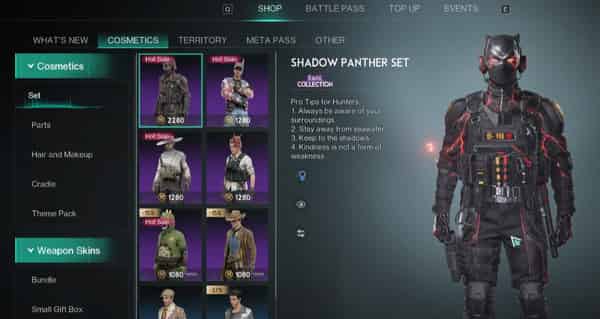
3. Click the gift icon next to the Buy button (instead of the regular purchase button).
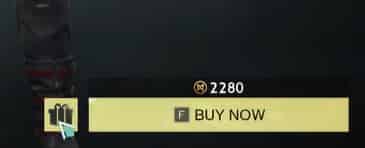
4. Confirm the purchase and select an eligible friend from the list.
5. Complete the transaction. The gift is sent to your friend’s account.
Important notes
You generally cannot gift a cosmetic after buying it for yourself — the gift option must be used at the time of purchase. Gifted items follow the same cross-character sharing rules as regular purchases on the recipient’s account. Always check the item description for any specific restrictions.
Can You Gift Crystgin in Once Human?
No. Once Human Crystgin is account-bound and cannot be directly transferred or gifted between different player accounts. It is shared across all characters on the same account and region through the cross-character sharing system. Event currencies such as T-Crystgin are also typically non-transferable.
If you want a friend to receive cosmetics, the best approach is to gift the items themselves from the Shop rather than sending currency.
Blueprint Sharing & Gifting
Introduced in a 2026 update, this feature lets players share and permanently gift base/territory blueprints.
- Share: The recipient can bookmark and view the blueprint but cannot build or further gift it.
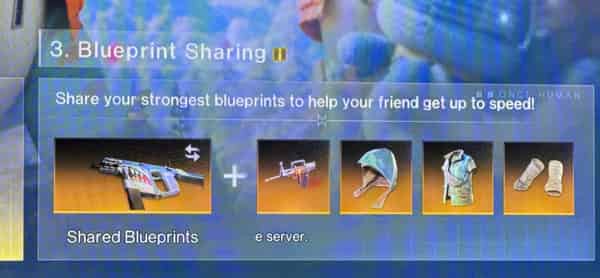
- Gift: The recipient gains full ownership, including the ability to build, share, and gift it further.
- Cross-server support is available as long as you are friends.
How it works
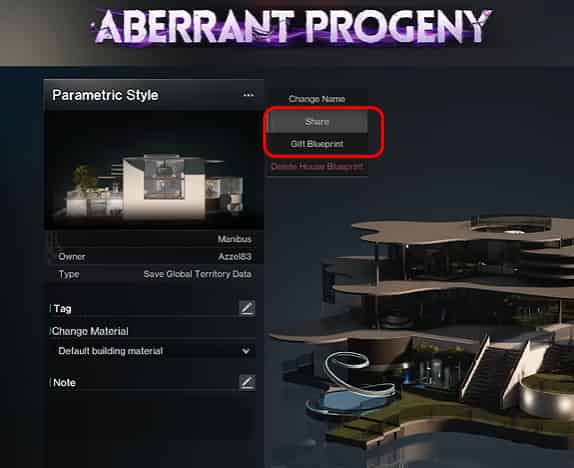
Add the player as a friend (player name is enough), open the blueprint interface, select the desired blueprint, and choose Share or Gift Blueprint. Recipients can filter out paid furniture, wallpaper, or building packs they do not own so they can still use the layout. Territory building blueprints have some restrictions, and blueprints also support cross-data sharing under the same account.
How to Give or Trade Regular Items (Weapons, Gear, Materials)
There is no universal one-click gift button for inventory items. Use these methods instead:
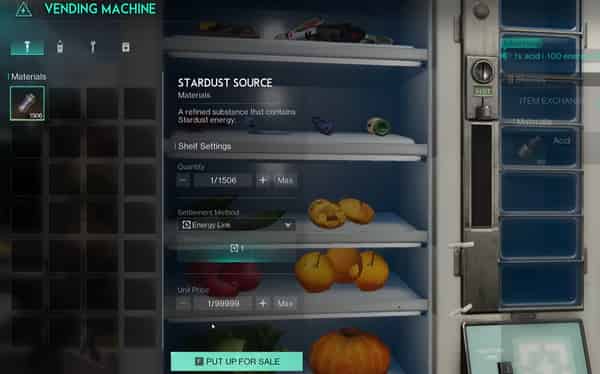
- Tools, Consumables, Materials, and Special items: Use Direct Trade with friends or a Vending Machine (only specific categories are allowed)
- Small materials (wood, plants, etc.): Drop them on the ground or place them in shared storage.
- Weapons & Armor: Place them in a Weapon or Armor Storage Crate and grant permissions, or use Trade if the item type allows it. Direct inventory transfer is usually blocked.
- Event Currency: Generally not transferable — check individual item rules.
Practical tips
For Trade, stand near a friend, open their player menu, select Trade, lock the items, and confirm. For storage, place items in a crate, then grant the friend Storage Privileges via the Social menu. Always double-check permissions to avoid accidental loss.
Best Place to Top Up Crystgin for Gifting in Once Human
Although Crystgin cannot be gifted directly in-game, you can still send it to a friend by topping up to their account. On TOPUPlive, simply enter your friend’s UID when purchasing, and the Crystgin will be credited to their account .You can also top up for yourself if you plan to gift cosmetics from the Shop.
Pack Type | In-Game Price | TOPUPlive Price | Discount |
|---|---|---|---|
62 Crystgin | $0.99 | $0.94 | 11% OFF |
339 Crystgin | $4.99 | $4.46 | 17% OFF |
1120 Crystgin | $14.99 | $12.58 | 17% OFF |
2340 Crystgin | $29.99 | $25.08 | 17% OFF |
3979 Crystgin | $49.99 | $41.80 | 16% OFF |
8075 Crystgin | $99.99 | $84.99 | 11% OFF |
Meta Pass (30 Days) | $4.99 | $4.46 | 17% OFF |
>>Check more Once Human top up discounts
Youth Selection Gift Pack
Starter Selection Gift Pack
Luxurious Selection Gift Pack
Advanced Selection Gift Pack
👉See also: Is TOPUPlive Legit?
Troubleshooting Common Gifting Issues
Problem | Likely Cause | Solution |
|---|---|---|
Did not receive cosmetic gift | Friendship under 7 days, weekly limit reached, or delivery delay | Confirm friendship duration and remaining weekly gifts; wait a few minutes or relog |
Gift option missing in Shop | Character level too low or item not giftable | Reach Level 5 on highest character; check item description |
Friend not appearing in gift list | Not friends long enough or different region | Wait until the 7-day mark; ensure same region if required |
Blueprint gift failed | Not friends or system restriction | Add as friend first; try sharing instead of gifting |
If a purchase or gift still fails after checking the above, contact official support with transaction details.
FAQs About Once Human Gifting
1. Can I gift a character cosmetic after purchasing it for myself?
No. Use the gift icon at the time of purchase.
2. Can I gift weapons directly?
Not with a simple gift button. Use storage permissions, Trade (if the item type allows), or other workarounds.
3. Is Crystgin giftable?
No. Only cosmetics bought with it can be gifted via the Shop.
4. Does blueprint gifting work across servers?
Yes, as long as you are friends.
5. Are there weekly limits on Shop gifts?
Yes. Limits increase as your highest character levels up.
Conclusion
Gifting in Once Human is straightforward once you know which system to use: the Shop gift option for cosmetics, the dedicated Blueprint feature for bases, and trades or shared storage for regular items. Always meet the friendship and level requirements to avoid failed gifts.
When choosing an Once Human top-up center, look for a platform that offers secure UID top-up, competitive prices, fast delivery, and good customer support. Avoid unofficial sellers with unclear reputations to reduce the risk of delayed or failed top-ups.
>>Top Up Once Human Now <<

Lucy Lauria
Game writer
I spend most of my time exploring game worlds, testing new features, and learning how different systems work. Through my writing, I aim to share useful insights, helpful strategies, and clear guides that make games more enjoyable for everyone.
Related products

Related News

Honor of Kings Gifting Guide: How to Gift Skins & Boost Nobility
VALORANT Gifting Guide: How to Gift Skins, Bundles & VP to Friends
Once Human Version 3.0.6 Update: Beast Riding, Server Merges, Isles of Abyss & More
PUBG MOBILE Ocean Odyssey Guide: Back to the Deep
Foundation: Galactic Frontier Season 2: The Usurper – Release Date, Story, Features & Events
Sausage Man SS25 Season Update: Create & Destroy Release Date, New Weapons, Season Pass & More
Delta Force Loot Guide: Valuable Items and Loot Priorities
Arena Breakout: Infinite Season 7 Weapon Tier List: Which Guns Should You Use?


