



Arena Breakout Infinite System Requirements Bypass: How to Play Below Specs

2026-07-03 16:51:31
You downloaded the launcher. Hit "Play." Got a popup: "Your system does not meet the minimum requirements." The game refuses to launch.
The system check compares your hardware against a whitelist of supported CPUs and GPUs. A GTX 950 does not pass. An i5-4460 does not pass. But these components can run the game. Here is how to bypass the check and launch anyway.
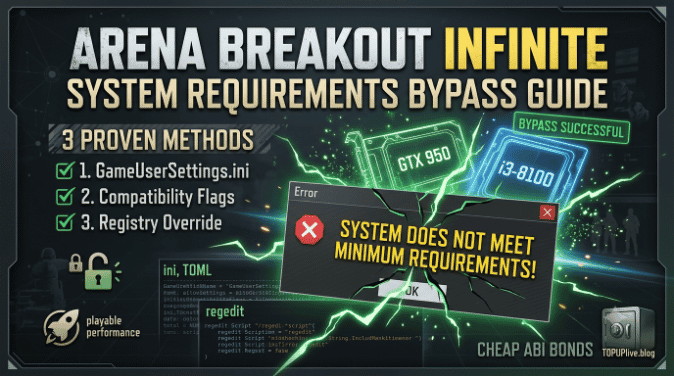
▍Arena Breakout Infinite System Requirements Bypass Guide
Method 1: Bypass Via GameUserSettings.ini
Navigate to %LOCALAPPDATA%\ABInfinite\Saved\Config\WindowsNoEditor\GameUserSettings.ini.
Add or modify these lines:
Ini, TOML |
|---|
[ScalabilityGroups] sg.ResolutionQuality=50 sg.ViewDistanceQuality=0 sg.AntiAliasingQuality=0 sg.ShadowQuality=0 sg.PostProcessQuality=0 sg.TextureQuality=0 sg.EffectsQuality=0 sg.FoliageQuality=0 sg.ShadingQuality=0 |
All values at zero force the game to launch with minimum settings.
⚠️ CRITICAL STEP: Right-click the file → Properties → check "Read-only." The game will overwrite this file on launch unless it is locked.
Method 2: Bypass Via Compatibility Flags
- Right-click ABInfinite.exe → Create shortcut.
- Right-click the new shortcut → Properties.
- Locate the Target field and append these flags to the very end:
Bash |
|---|
-notexturestreaming -nosplash -windowed |
What each flag does:
- -notexturestreaming: Disables texture streaming (reduces VRAM requirement).
- -nosplash: Skips intro logos (saves launch time, avoids potential crash triggers).
- -windowed: Launches in windowed mode (bypasses resolution checks).
💡 PRO TIP: Launch the game through this specific shortcut. If the game loads successfully, you can safely switch back to fullscreen in the in-game settings.
Method 3: Registry Override (Advanced)
- Open Registry Editor (Press Win + R, type regedit, and hit Enter).
- Navigate to: HKEY_CURRENT_USER\Software\ABInfinite
- Create a new DWORD (32-bit) Value named SkipHardwareCheck.
- Double-click it and set the Value data to 1.
🛑 NOTE: This is the nuclear option. It tells the launcher to skip the entire hardware verification pipeline. If the game still crashes on launch with this enabled, your hardware genuinely cannot run it.
💡 Pro Tip for ABI Players: Now that you've bypassed the lock and got the game running, you'll need the right gear and secure containers to secure your loot. To gear up for your next high-stakes raid without breaking the bank, check out TOPUPlive. It’s a secure, trusted official partner offering fast Arena Breakout Infinite bonds top-ups at much lower prices than standard stores, helping you secure your secure containers and premium gear for less.
【👉Exclusive discount code for you: topupliveblog】


100 Bonds


Klukai Guarantee Bundle
Leva Guarantee Bundle
Sangvis Ferri Bundle
▍What "Below Specs" Actually Means
The Official Minimum Requirements:
- CPU: Intel Core i5-8400 or AMD Ryzen 5 1600
- GPU: NVIDIA GTX 960 (2GB) or AMD R9 280 (3GB)
- RAM: 16 GB
- Storage: 60 GB SSD
Tested Hardware Below Specs (Successful Bypass):
Component | Official | Tested Minimum | Average FPS (Low Settings) |
CPU | i5-8400 | i3-8100 | 30-40 FPS |
GPU | GTX 960 | GTX 950 (2GB) | 25-35 FPS |
RAM | 16 GB | 12 GB | Playable with stutter |
RAM | 16 GB | 8 GB | Crashes on Armory, playable on Farm |
⚠️ RAM WARNING: The RAM requirement is the hardest wall. Below 12 GB, map loading fails on large maps (Armory, Northridge). Farm and TV Station remain playable on 8 GB.
▍Performance Expectations After Bypass
Manage your expectations. Playing below minimum specs means:
- 📉 25-40 FPS on Farm with all settings at minimum.
- 📉 15-25 FPS on Armory during firefights.
- ⏳ 10-15 second loading times (SSD) or 45-60 seconds (HDD).
- 🧱 Occasional texture pop-in and delayed LOD loading.
This is not a competitive experience. But it lets you play. For casual raids and PvE grinding, it works.
▍FAQs about Arena Breakout Infinite System Requirements Bypass Guide
Q: Will bypassing the hardware check get me banned?
A: No. The bypass modifies configuration files and registry values, not game memory or network traffic. Anti-cheat targets injected code, not config changes.
Q: The game launches but crashes after 5 minutes. What do I do?
A: Your hardware cannot sustain the game's resource demands. Reduce resolution to 1280×720. Close all background applications, including Discord and browser. If it still crashes, your hardware is below the tested minimum. An upgrade is the only option.
▍Need More Bonds for Your Next ABI Raid?
Running the game is just the first step—having the right gear and secure containers determines your survival. TOPUPlive offers a safe, official, and discounted way to top up Arena Breakout Infinite bonds! Enjoy:
- ✅ Official Partner: Secure transactions with zero ban risk.
- ✅ Exclusive Discounts: Save 10% to 12% off using blog code: topupliveblog.
- ✅ Instant Delivery: Fast and automated delivery straight to your account.
- ✅ 24/7 Support: Dedicated customer service whenever you need it.

Ethan Carter
game writer
I’m an overseas game writer mainly covering gaming news. I focus on anime titles like Wuthering Waves and Anomaly Loop, specializing in version updates, character introductions and limited-time in-game event articles.
Related products
Related News

Last War Survival Top Up: Best Way to Buy Packs, Diamonds, and Gift Codes
Last War Gold Bricks Guide: How to Get, Use, and Buy Gold Bricks Safely
Best Last War Packs to Buy: Complete Guide + Where to Get Them Cheaper
5 Best Last War Survival Top-Up Centers: Where to Get the Best Deals and Secure Recharges
AFK Journey Marene Guide: Skills, Best Teams, Build & Is She Worth Pulling?
Arena Breakout Season 14 Preview: C2S0 Release Date, New Contents and More
Honor of Kings 11th Anniversary Guide: Rewards, Free Skins, and Events
AFK Journey Baden Guide: Skills, Best Teams, Build & Is He Worth Pulling?


