



How to Send Gifts on BIGO Live: Gift Prices, Diamonds & Tips

2026-07-31 15:04:46
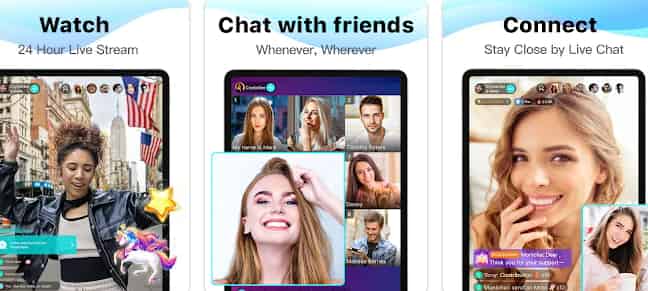
One of the most popular ways to interact with streamers on BIGO Live is by sending virtual gifts. If you're new to the platform, you might be wondering how gifting works, how much gifts cost, and where to buy Diamonds. This guide covers everything you need to know before sending your first BIGO Live gift.
Need BIGO Diamonds for gifting? TOPUPlive makes it easy to recharge Bigo diamonds and send gifts to your favorite creators at a competitive price.



Darknight Wolf King


Blood Moon Witch


Mystic Realm



200 Diamonds

What Are BIGO Live Gifts?
BIGO Live gifts are virtual items that viewers can send to broadcasters during live streams. They range from simple gifts with basic animations to premium gifts featuring elaborate visual effects.
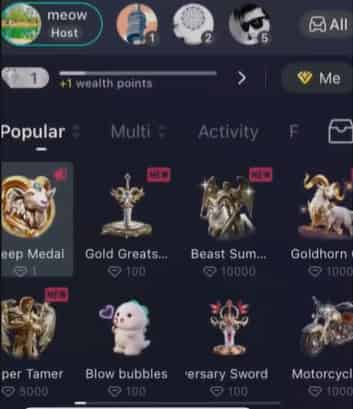
Here's how the gifting system works:
Viewer | BIGO Live System | Streamer |
|---|---|---|
Purchases Diamonds | Uses Diamonds to send gifts | Receives Beans from gifts |
Sends virtual gifts | Gift animation appears in the live room | Beans can later be withdrawn according to BIGO Live's policies |
Diamonds are the in-app currency used to purchase gifts, while Beans are the rewards creators receive after viewers send them gifts. This dual-currency system allows fans to support creators directly during live broadcasts.
Besides supporting streamers, sending gifts can also:
- Increase your visibility in the live room.
- Help you climb the streamer's Gift Ranking.
- Earn EXP to level up your BIGO Live account.
- Participate in special events and PK battles where gifts contribute to rankings.
👍Lear more about Bigo Gifts: BIGO Live Gifts List 2026: Prices, Most Popular Gifts & Diamond Cost Guide
How to Send Gifts on BIGO Live
Sending gifts only takes a few taps.
Step 1. Recharge BIGO Diamonds
Before you can send any gift, make sure your account has enough Diamonds.
Step 2. Join a Live Room
Open BIGO Live and enter the livestream of the broadcaster you want to support.
Step 3. Tap the Gift Icon
Tap the Gift button at the bottom of the screen to open the gift panel.
Step 4. Choose Your Gift
Browse through the available categories, including:
- Popular Gifts
- Activity Gifts
- VIP Gifts
- Backpack (free gifts earned from events)
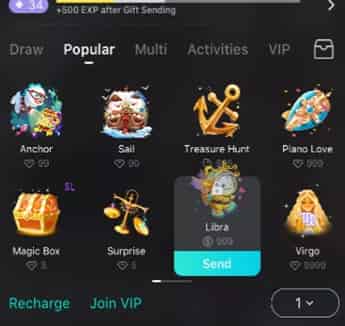
Each gift displays its Diamond price before you send it.
Step 5. Send the Gift
Tap Send to deliver the gift instantly.
The gift animation will appear on screen, your username may be displayed in the live room, and the broadcaster will receive the corresponding Beans.
How Much Do BIGO Live Gifts Cost?
BIGO Live gifts vary wildly in price, costing anywhere from less than one cent to over $2,500 USD. The exact cost depends entirely on the gift’s value in Diamonds (BIGO's in-app currency) and where you buy those Diamonds. On average, 1 Diamond costs about $0.02 to $0.03 USD.
Cost Breakdown of Popular Gifts
Gift Name | Diamond Cost | Estimated USD Price | Visual Effect Level |
|---|---|---|---|
Hearts / Flowers | 1 – 5 Diamonds | $0.02 – $0.15 | Low (Basic chat interaction) |
Teddy Bear | 100 Diamonds | $2.00 – $3.00 | Medium (Fun pop-up) |
Sports Car | 1,000+ Diamonds | $20.00 – $30.00 | High (Screen-wide entry effect) |
Fortune Dragon | 7,777 Diamonds | $155.00 – $230.00 | Premium (Large luck-themed animation) |
Gala Dragon | 9,999 Diamonds | $200.00 – $300.00 | Premium (Full screen-sweep) |
Private Jet S3 | 10,000 Diamonds | $200.00 – $310.00 | Elite (Exclusive room-wide notification) |
Luxury Yacht | 39,999 Diamonds | $800.00 – $1,200.00 | Ultra-Luxury (Highly prestigious) |
Diamond Masquerade | 80,000 Diamonds | $1,600.00 – $2,500+ | Peak Luxury (Rarest gift on the app) |





Where to Buy BIGO Live Diamonds for Gifts?
Since gifts are purchased with Diamonds, you'll need to recharge your account before sending gifts. There are two common ways to buy BIGO Diamonds.
Option 1: Recharge Through BIGO Live
You can purchase Diamonds directly inside the BIGO Live app using your preferred payment method.
Pros
- Official recharge channel
- Direct integration with your account
Cons
- Prices may vary depending on your region.
- App store pricing can sometimes be higher.
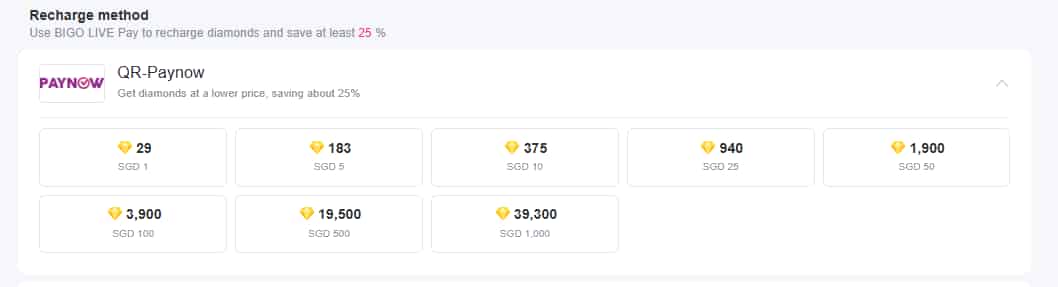
Option 2: Recharge Through TOPUPlive
Third-party recharge platforms like TOPUPlive offer BIGO Diamond recharge with multiple payment methods and competitive pricing.
For example:
Diamonds | Official Price | TOPUPlive Price | Discount |
|---|---|---|---|
200 | $6.80 | $3.88 | 46% |
1,000 | $32.00 | $20.20 | 43% |
2,000 | $62.50 | $40.20 | 43% |
3,000 | $93.80 | $53.86 | 43% |
5,000 | $156.00 | $99.00 | 35% |
10,000 | $285.80 | $190.00 | 32% |
20,000 | $535.00 | $391.88 | 26% |
40,000 | $1,060.00 | $783.76 | 26% |
View more Bigo diamonds packages on TOPUPlive:
Darknight Wolf King
Blood Moon Witch
Mystic Realm
200 Diamonds
👉See also: Is TOPUPlive Legit?
Tips Before Sending BIGO Live Gifts
Before spending your Diamonds, keep these tips in mind:
- Check the recipient carefully. Once a gift is sent, it generally cannot be reversed.
- Set a budget. Virtual gifts are optional and should fit comfortably within your spending limits.
- Look out for seasonal events. BIGO Live often launches limited-time gifts and reward campaigns.
- Use trusted recharge channels. Purchase Diamonds through official or reputable top-up platforms to reduce the risk of account issues.
- Review the Diamond cost before sending. Premium gifts can require a significant number of Diamonds.
FAQs About How to Send Bigo Gifts
1. How Can I Send Gifts Anonymously on BIGO Live?
In most cases, BIGO Live displays the sender's username when a gift is sent. Anonymous gifting is not a standard feature, although certain events or platform updates may change how gift information is displayed.
2. Why Can't I Send Gifts on BIGO Live?
Common reasons include:
- Insufficient Diamonds
- Poor internet connection
- Temporary server maintenance
- Account restrictions
- Using an outdated version of the app
If you've successfully recharged Diamonds but they don't appear in your account, BIGO recommends contacting customer support through the in-app Help & Feedback section with your transaction details.
3. How Do I Claim Gifts on BIGO Live?
Viewers don't "claim" gifts sent during livestreams. However, BIGO Live occasionally rewards users with free promotional gifts through events, daily tasks, or campaigns. These free gifts are stored in the Backpack section of the gift panel and can be sent without spending Diamonds.
4. What Is the Highest Gift on BIGO Live?
Special event-exclusive luxury items like the Gala Dragon and Cyber Dragon, which frequently cost tens of thousands of Diamonds.
5. Can I Send BIGO Live Gifts for Free?
Yes, but only in limited situations. BIGO Live sometimes gives users free gifts through login rewards, platform events, or promotional activities. These gifts are stored in your Backpack and can be sent just like purchased gifts without using Diamonds.
Conclusion
Sending gifts on BIGO Live is one of the easiest ways to support your favorite broadcasters and become a more active member of the community. Once you understand how Diamonds, gifts, and Beans work together, the gifting process becomes straightforward.
Whether you choose to recharge through the official app or a trusted third-party platform like TOPUPlive, always compare available Diamond packages and purchase through reliable channels before joining your next livestream.

Lucy Lauria
Game writer
I spend most of my time exploring game worlds, testing new features, and learning how different systems work. Through my writing, I aim to share useful insights, helpful strategies, and clear guides that make games more enjoyable for everyone.
Related products
Related News

Top 5 Best 4Fun Diamonds Recharge Sites
Junko Coins Top Up Guide: Prices, Top-Up Methods & How to Top Up
Cocco Coins Top Up Guide: Price, Methods & How to Get Cocco Coins
Best Douyin Top Up Websites: Trusted & Cheapest Diamonds Compared
Douyin App Guide: What It Is, Download, Account & Recharge Diamonds
Tango App: Everything You Need to Know
Where to Buy Yalla Ludo Diamonds: 4 Best Platforms Compared (Codashop, SEAGM, Carry1st & TOPUPlive)
Higo Coins Recharge Guide: How to Top Up Higo Coins Safely and Save More


