



Douyin Account Guide: How to Create, Log In, Recover & Delete a Douyin Account

2026-07-15 17:35:05
Douyin (mainland China’s domestic short-video platform) operates independently from global TikTok, with separate account systems, content pools and operation rules. This guide walks users through all core account operations from sign-up to permanent deletion, along with fixes for common issues.
▍How to Create a Douyin Account
There are 3 common ways to make a Douyin account, with clear differences in stability and available features for users.
Method 1: Sign Up with +86 Chinese Phone Number (Most Reliable)
- Download the Douyin app first.
See this guide for detailed download instructions 👉:
Complete Guide: How to Download Official Chinese Douyin (TikTok China Version) 2026 - Open Douyin, tap "我 (Me)" at the bottom right. Select country code +86, enter your valid Chinese mobile number. Unregistered phone numbers will be automatically registered once verified.
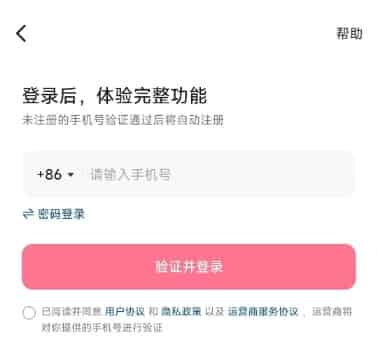
- Tap "验证并登录 (Verify and Log In)" and fill in the 6-digit SMS code.
- Remember to set a secure login password.
- Set your "名字 (username)", "头像(avatar)" and "简介 (profile bio)".
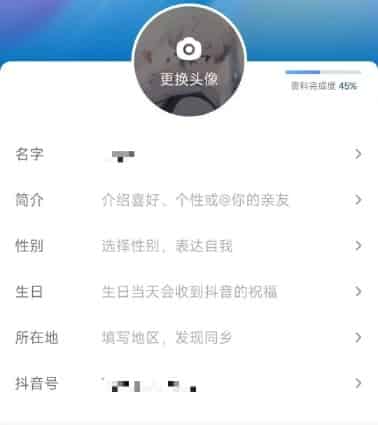
- Complete real-name verification to unlock full functions.
- Path: "我 (Me)" → "右上角菜单 (top-right menu)" → "设置 (Settings)" → "账号与安全 (Account & Security)" → "实名认证 (Real-name)"
- Eligible foreigners can use a Chinese Foreign Permanent Resident ID Card for verification.
- Unverified accounts can only browse public videos, with core interactive features locked.
Method 2: Sign Up with Overseas Phone Number
- On the sign-up page, select your local country code (e.g. +1 for US/Canada, +44 for UK).
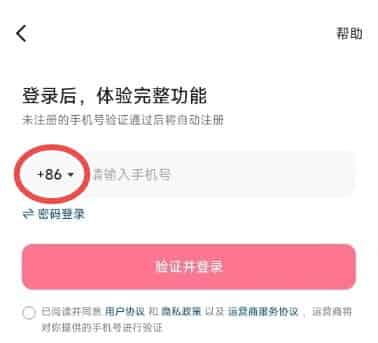
- Enter your overseas mobile number and request a verification code.
- If you receive the SMS code, finish password and profile setup.
- Key limitation: Standard foreign passports or visas do not support real-name verification. This account will remain feature-limited permanently.
Method 3: Quick Sign Up with WeChat / QQ
- On the sign-up page, tap "其他方式登录 (Other Login Methods)".
- Choose WeChat or QQ and authorize account access.
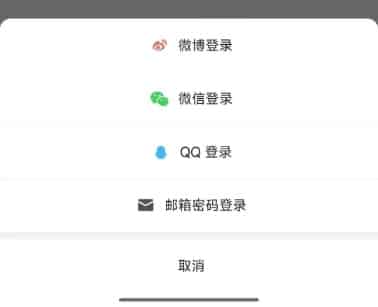
- Finish basic profile setup.
- Bind a Chinese mobile number later in account settings to avoid login failures.
▍How to Log Into Your Douyin Account
You can log in through 3 simple channels:
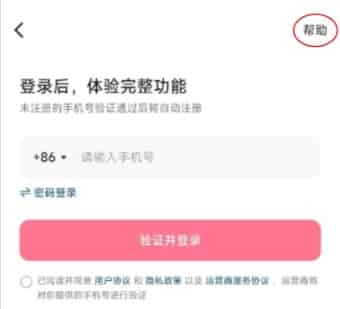
- SMS Code Login: Enter your bound phone number, request a 6-digit verification code and log in instantly.
- Password Login: Enter your registered phone number and preset password to log in.
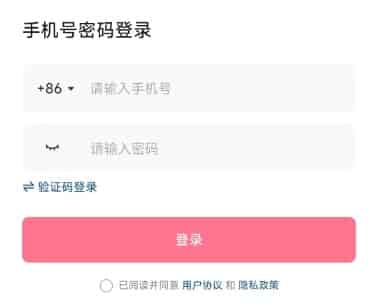
- Third-Party Login: Tap the WeChat or QQ icon for one-click authorization (requires prior binding).
Note: Frequent logins from overseas IPs may trigger security checks and temporary account restrictions.
▍How to Recover Your Douyin Account
Scenario 1: You still have access to your bound phone number
- Enter your registered phone number and get the SMS verification code.
- Enter the code and set a new login password.
Scenario 2: Lost phone number but bound WeChat/QQ
- Log in directly via your linked WeChat or QQ account, then go to Account & Security to replace your old phone number with a new valid one.
Scenario 3: Account locked due to overseas IP risk
- Tap the customer service entry on the login page, submit your account ID and explain your overseas usage situation to apply for unlock.
▍Essential Douyin Account Settings
All settings can be found via: Me → top-right menu → Settings.
1. Account & Security Settings (账号与安全设置)
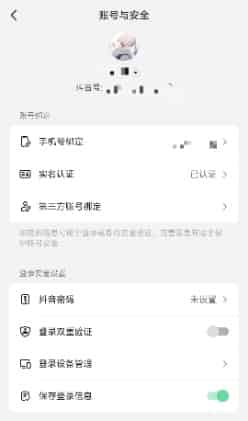
- Bind or update your mobile number to keep account access stable.
- Remember to set a secure login password.
- Manage linked third-party accounts (WeChat/QQ) for alternative login.
- Check the login device list and log out any unfamiliar devices remotely.
- Complete real-name verification to unlock full platform functions.
2. Privacy Settings (隐私设置)
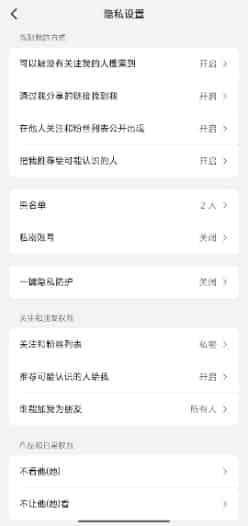
- Adjust video visibility (Public / Followers Only / Private).
- Restrict private message senders to mutual followers to block spam.
- Turn off IP location display to hide your overseas region.
- Manage block list to filter unwanted users and comments.
3. Payment Settings (支付设置)
- Only accessible after real-name verification.
- Supports Chinese bank cards, Alipay and WeChat Pay.
- Foreign credit cards are not accepted for in-app purchases.
💡 Tip: If you want to top up Douyin Diamonds, you can choose TOPUPlive. TOPUPlive provides direct Douyin top-up services where you only need to provide your User ID. Once payment is made, the Douyin Diamonds will be credited to your Douyin Account shortly. It is fast, convenient, and secure.



300 Diamonds

500 Diamonds



1000 Diamonds

2000 Diamonds

▍How to Delete Your Douyin Account Permanently
1. Pre-Deletion Requirements (all must be met)
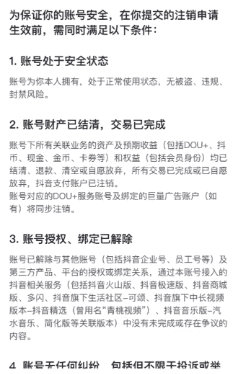
- No unpaid orders, unwithdrawn balance or pending transactions in Douyin Wallet.
- No active account penalties, appeals or disputes.
- All third-party linked accounts have been unbound.
- You can receive SMS codes via your bound phone number.
2. Step-by-Step Deletion Guide
- Go to Me → top-right menu → Settings → Account & Security.
- Select Delete Account.
- Read the deletion notice carefully (deletion is irreversible; all account data will be erased permanently).
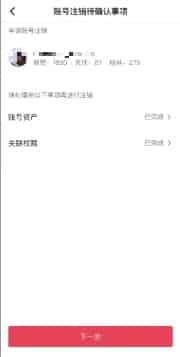
- Agree to the terms and enter the SMS verification code from your bound phone.
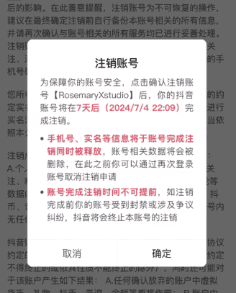
- Complete the 7-day cooling-off period:
Logging in within 7 days will automatically cancel the deletion request.
The account will be permanently deleted after 7 consecutive days of no login.
▍FAQs about Douyin Account
1. Can I sign up for Douyin with a foreign phone number?
You can try, but most overseas carriers cannot receive Douyin’s verification SMS. Accounts registered this way also cannot unlock full features without valid real-name credentials.
2. Why can’t I pass real-name verification with my passport?
Douyin only accepts Chinese Foreign Permanent Resident ID Cards for foreign users. Standard passports, tourist or student visas are not supported.
3. Why does my account get locked when I use Douyin abroad?
Frequent cross-region logins trigger platform anti-fraud security checks. You can contact customer service to apply for account unlock.
4. Does Douyin have an English interface?
The mainland China Douyin app only supports Simplified Chinese natively.
5. Can I cancel account deletion during the 7-day waiting period?
Yes, logging into your account within 7 days will automatically cancel the deletion request.
▍Conclusion
This guide covers the full lifecycle of Douyin account operations for overseas users, from initial sign-up and daily login to account recovery, personalized settings and permanent deletion. Before using the platform, familiarize yourself with its rules and function limits, and keep your account credentials secure to avoid access issues.
TOPUPlive provides Douyin Diamond recharge options from 300 Diamonds to 100,000 Diamonds, with discounts on multiple packages, making it easier to buy Diamonds safely and conveniently.

Ethan Carter
game writer
I’m an overseas game writer mainly covering gaming news. I focus on anime titles like Wuthering Waves and Anomaly Loop, specializing in version updates, character introductions and limited-time in-game event articles.

Related products

Related News

Junko Coins Top Up Guide: Prices, Top-Up Methods & How to Top Up
Cocco Coins Top Up Guide: Price, Methods & How to Get Cocco Coins
Best Douyin Top Up Websites: Trusted & Cheapest Diamonds Compared
Douyin App Guide: What It Is, Download, Account & Recharge Diamonds
Tango App: Everything You Need to Know
Where to Buy Yalla Ludo Diamonds: 4 Best Platforms Compared (Codashop, SEAGM, Carry1st & TOPUPlive)
Higo Coins Recharge Guide: How to Top Up Higo Coins Safely and Save More
DiDO Top Up Guide: How to Buy DiDO Coins for Less


