



Arena Breakout Infinite Cross-Platform Multiplayer Tutorial (PC + Mobile)

2026-05-25 14:21:44
Playing with friends is what makes extraction shooters shine — but Arena Breakout's multi-platform setup creates confusion about who can play with whom and how. This tutorial walks you through every multiplayer scenario: PC-only squads, mobile-only squads, and the one exception that lets PC and mobile players fight together (China server).
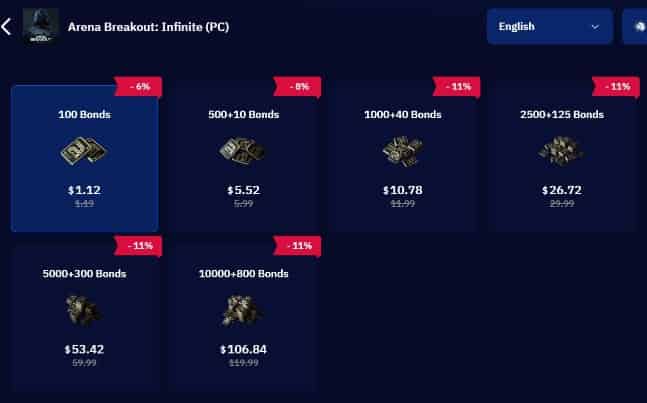
Still struggling to save up enough Bonds for your favorite high-tier gear and outfits? You aren't alone. Visit TOPUPlive to get your Arena Breakout top-up discount of up to 11%! Don't forget to use the promo code: >>topupliveblog<< for an extra deal!



100 Bonds


Klukai Guarantee Bundle
Leva Guarantee Bundle
Sangvis Ferri Bundle
▍The Short Answer: Crossplay Status at a Glance
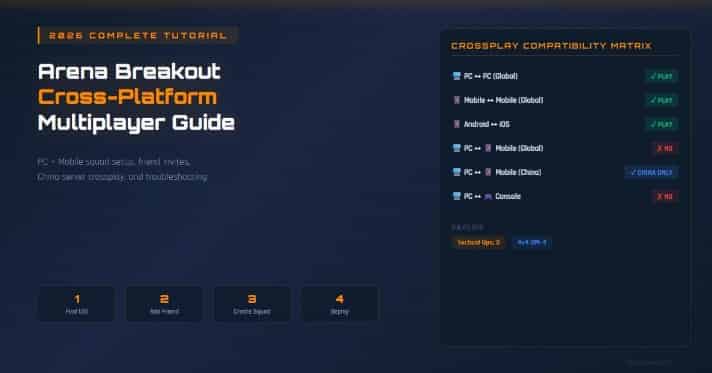
Before diving into setup steps, understand the three products and their crossplay rules.
Platform Combo | Can Play Together? | How |
PC (Global) ↔ PC (Global) | ✅ Yes | Same game, UID invite |
Mobile (Global) ↔ Mobile (Global) | ✅ Yes | Same game, username invite |
Android ↔ iOS (Mobile Global) | ✅ Yes | Shared matchmaking pool |
PC (Global) ↔ Mobile (Global) | ❌ No | Separate ecosystems |
PC (China) ↔ Mobile (China) | ✅ Yes | Tencent backend bridge |
PC (Global) ↔ PC (China) | ❌ No | Different servers |
Mobile (Global) ↔ Mobile (China) | ❌ No | Different servers |
PC ↔ Console | ❌ No | Console version not released |
▍How to Play Arena Breakout: Infinite With Friends on PC
This section covers the global PC version, available on Steam and the official website.
⚠️ Key Takeaway: The global version keeps PC and mobile completely separate. The China version is the only way PC and mobile players can enter the same raid. Each section below covers the exact steps for your scenario.
Step 1: Find Your UID
Every Arena Breakout: Infinite player has a unique UID (User ID). This is your identity for the friend system — Steam friends do not automatically transfer into the game.
- Open the game launcher.
- Click Account Center.
- Copy your Open ID / UID.
- Share this UID with friends you want to add (you'll need theirs too).
Step 2: Add Friends In-Game
- Open the Friends panel from the main menu.
- Click Add Friend or Search.
- Enter your friend's UID.
- Send the friend request and wait for them to accept.
Note: You can also add players you've recently matched with from the Recent Interaction tab.
Step 3: Create a Squad
- From the main menu, select Squad or Party.
- Click on a friend's name in your Game Friends list.
- Select Invite to Squad.
👥 Squad Size Limits: Maximum 3 players per squad for Tactical Ops and Covert Ops modes. The 4v4 Deathmatch mode uses a 4-player team format.
Step 4: Choose Your Game Mode and Deploy
Mode | Squad Size | Description |
Tactical Ops | Up to 3 | Standard extraction raids with PvP and PvE |
Covert Ops | Up to 3 | Lower-risk raids with reduced PvP intensity |
Solo Ops | 1 Only | Solo extraction — no squad allowed |
4v4 Deathmatch | 4 | Fast-paced team combat |
After forming your squad, the squad leader selects the map and mode. All squad members enter matchmaking together. Expect 15–45 seconds of queue time depending on your region.
▍How to Play Arena Breakout Mobile With Friends
The mobile version (global) has its own friend and squad system, separate from the PC version.
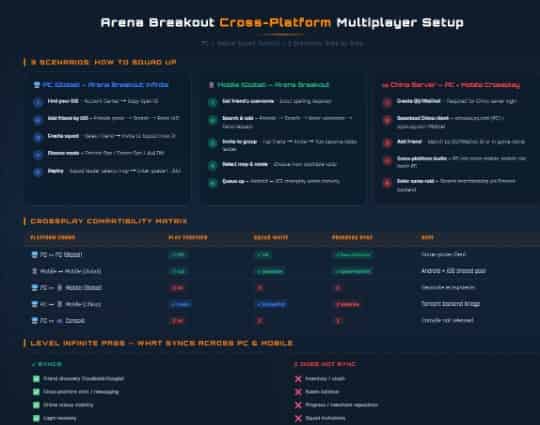
Step 1: Add Friends by Username
- Open the Friends window (top-right corner of the lobby).
- Tap Search or the Add Friend icon.
- Enter your friend's exact username and send the request.
Alternative Discovery Methods:
- Recent Activity: Shows players with similar play schedules.
- Recent Interaction: Lists players you've recently matched with in random raids.
- Referral Program: Share a unique referral code to earn mutual rewards.
Step 2: Form a Squad on Mobile
- From the lobby, open your Game Friends list.
- Tap a friend's name and select Invite to Group.
- You become the lobby leader — choose the map and mode.
- Once everyone marks "Ready", enter the queue.
📱 Cross-OS Play: Android and iOS players share the same matchmaking pool. You can add, invite, and squad up with friends regardless of which phone they use.
Visit TOPUPlive—your trusted Arena Breakout top up—to get more resources for your supply runs! Build your ultimate tactical stash with our secure, efficient, and affordable top-up services.
>>Click the image to use the promo code: topupliveblog now!<<
▍The China Server: The Only Way to Play PC + Mobile Together
The China version is the only Arena Breakout build where PC and mobile players share the same raids.
Why Only China Has PC-Mobile Crossplay
The China version runs on Tencent's unified backend infrastructure, which bridges the PC and mobile clients. The global version, published by Level Infinite, uses a different backend architecture that keeps the two platforms isolated.
Tencent's system handles:
- Shared Matchmaking: PC and mobile players enter the exact same raid queues.
- Cross-Platform Invites: PC players can seamlessly invite mobile friends and vice versa.
- Unified Economy: Both platforms access the same Flea Market and merchant inventories.
Step-by-Step: Set Up China Server Crossplay
- Step 1: Create a QQ or WeChat Account
The China version requires a QQ or WeChat account — Level Infinite Pass will not work. Download QQ International or WeChat from your app store, register with your phone number, and complete SMS verification.
- Step 2: Download the Correct Client
- PC (China): Download from the official site aqtwwx.qq.com
- Mobile (China): Download from aqtw.qq.com or via the OurPlay app
(Do not download the global version; it cannot connect to China servers).
- Step 3: Squad Up Across Platforms
Log in using QQ/WeChat, open the Party/Squad menu, select your friend (regardless of their platform), and send the invite.
- Step 4: Handle Region Lock Issues
If you are outside mainland China and see a "Region Not Available" error, use a VPN with Chinese servers or install a game accelerator like LagoFast for optimal routing.
China Crossplay Limitations
Feature | Status | Notes |
PC ↔ Mobile in same raid | ✅ | Fully supported |
Shared inventory/progress | ❌ | Separate per platform |
Koens Transfer | ❌ | Not transferable between your accounts |
Anti-Cheat System | ✅ | Powered by Tencent's advanced anti-cheat |
▍Cross-Platform Friend System: Level Infinite Pass Explained
The Level Infinite Pass connects the global PC and mobile versions at the social layer only.
- What it DOES Sync:
- ✅ Friend Discovery: Find friends across PC and mobile via Facebook/Google binding.
- ✅ Cross-Platform Chat: Send text messages to friends on the other platform.
- ✅ Online Status: See when friends are playing on either platform.
- What it DOES NOT Sync:
- ❌ Inventory & Koens: Your stash and currency stay locked to your platform.
- ❌ Progress/Level: Merchant reputation and quest progress are separate.
- ❌ Squad Invitations: You cannot invite a mobile friend into a PC raid (or vice versa).
▍Squad Strategy: Getting the Most From Multiplayer
Playing in a coordinated squad dramatically increases your survival and profit per raid.
Role Distribution for 3-Player Squads
- Point (Entry): Leads movement, clears angles, calls contacts. Focus: Heavy armor + close-range weapons.
- Support: Covers flanks, provides overwatch, carries meds. Focus: Mid-range weapons + medical supplies.
- Flex / Looter: Secures loot while team fights, manages extraction timing. Focus: Large backpack + speed loadout.
Communication Best Practices
- Use Callouts, Not Descriptions: "Contact north, second floor window" beats "someone's over there."
- Designate a Squad Leader: One person makes the final call on push, retreat, or extract decisions.
- Track the Clock: One player should always monitor the match timer and call out extraction windows.
▍Troubleshooting Common Multiplayer Issues
- Can't Find My Friend in Search
Verify you're on the same version. Global and China versions use completely separate databases. Also double-check UID numbers (PC) vs. usernames (Mobile).
- Friend Is Online But Can't Invite Them
They might be in an active raid (invites cannot be received mid-match), or you are encountering the global platform mismatch limitation.
- High Ping When Playing With Cross-Region Friends
Disable AutoMatch to avoid being thrown into a distant server, and ensure your squad leader is in the region closest to the majority of players.
- Can't Access China Server From Outside China
Ensure you are using a QQ/WeChat login. If blocked, use a network accelerator or VPN configured for mainland China nodes.
▍Frequently Asked Questions
1. Can PC and mobile players play Arena Breakout together?
On the global version, no. They are separate products. On the China version, yes, via Tencent's unified backend.
2. What is the maximum squad size in Arena Breakout: Infinite?
3 players for Tactical/Covert Ops, and 4 players for the 4v4 Deathmatch mode.
3. Can I use Steam friends to invite people in Arena Breakout: Infinite?
No. You must exchange in-game UIDs to add friends.
4. Will crossplay between PC and mobile come to the global version?
There is no official announcement. The developers have stated both versions are balanced differently to suit their respective control schemes.
5. Can I transfer my mobile progress to the PC version?
No. Progress, inventories, and currency are completely isolated and non-transferable.
Last updated: May 2026. Crossplay status, squad mechanics, and server features are subject to change with seasonal updates. Check the official Arena Breakout: Infinite website for the latest information.
Ready to gear up? Head to TOPUPlive for fast, discounted Arena Breakout Bonds top-up and enjoy more raids with premium advantages. Play smart and extract safely!

Nightwind Ororon
game writer
I focus on crafting guides, tips, and strategy content that truly resonates with players. Being deeply invested in Genshin Impact and Honkai: Star Rail, I love exploring every new map and character kit. I take my firsthand experience from the latest updates and turn it into simple, actionable advice to help fellow players navigate Teyvat and the Cosmos with ease.

Related products


Related News

Tower of Saviors Top Up Guide: Price, Methods & How to Get Diamonds
Aniimo Season 1 Part 2 Preview: New Aniimo, Maps, Events, and More
Last War Survival Top Up: Best Way to Buy Packs, Diamonds, and Gift Codes
Last War Gold Bricks Guide: How to Get, Use, and Buy Gold Bricks Safely
Best Last War Packs to Buy: Complete Guide + Where to Get Them Cheaper
5 Best Last War Survival Top-Up Centers: Where to Get the Best Deals and Secure Recharges
AFK Journey Marene Guide: Skills, Best Teams, Build & Is She Worth Pulling?
Arena Breakout Season 14 Preview: C2S0 Release Date, New Contents and More


