



Marvel Rivals Top Up Guide: How to Buy Lattice Safely & Save Money

2026-06-29 11:01:10
Marvel Rivals is NetEase’s popular free-to-play hero shooter featuring iconic Marvel characters in fast-paced 6v6 battles. With stunning skins, emotes, battle passes, and cosmetic bundles, many players want to enhance their experience by topping up. This guide explains everything you need to know about Marvel Rivals top up, the currency system, official methods, third-party options, safety tips, and ways to save money.
Short of Lattice? Head over to TOPUPlive to grab Marvel Rivals top up discount up to 15%!



100 Lattices



All In One Bundle
500 Lattices

1000 Lattices

What Is Marvel Rivals Top Up?
Topping up in Marvel Rivals means purchasing Lattice, the game’s premium currency, with real money. This allows you to:
- Buy the Luxury Battle Pass (and its upgraded version)
- Unlock premium skins, emotes, sprays, banners, and MVP animations
- Purchase limited-time cosmetic bundles
Players top up mainly for cosmetics and faster battle pass progression, since the game is free-to-play and focuses on a cosmetic-driven economy. You don’t need to top up to compete, but it lets you customize your favorite heroes stylishly.
Marvel Rivals Currency System Explained
Marvel Rivals uses three main currencies:
Currency | Color/Type | How to Get | Main Uses | |
|---|---|---|---|---|
Lattice |
| Gold (Premium) | Real-money purchase + small Battle Pass rewards | Battle Pass, premium bundles, convert to Units |
Units |
| Blue | 1:1 conversion from Lattice + limited free rewards (Battle Pass, events, achievements) | Skins, emotes, cosmetics in the shop |
Chrono Tokens |
| Purple | Gameplay, Battle Pass progression, events | Battle Pass rewards track |



Key Notes:
- Lattice is the primary paid currency.
- Lattice converts to Units at a 1:1 ratio (one-way only).
- You can combine Lattice/Units toward purchases in many cases.
- Most legendary skins cost 1,600–2,400 Units. The standard Luxury Battle Pass costs around 990 Lattice.
👉 Read more: Marvel Rivals Lattice Guide: What It Is, How to Get & Best Ways to Use It
Official Ways to Top Up Marvel Rivals
The safest way is through official channels:
- In-game Store (recommended on all platforms)
- Platform Stores: Steam, PlayStation Store, Xbox Store (and others like Epic/Loading Bay depending on your launcher)
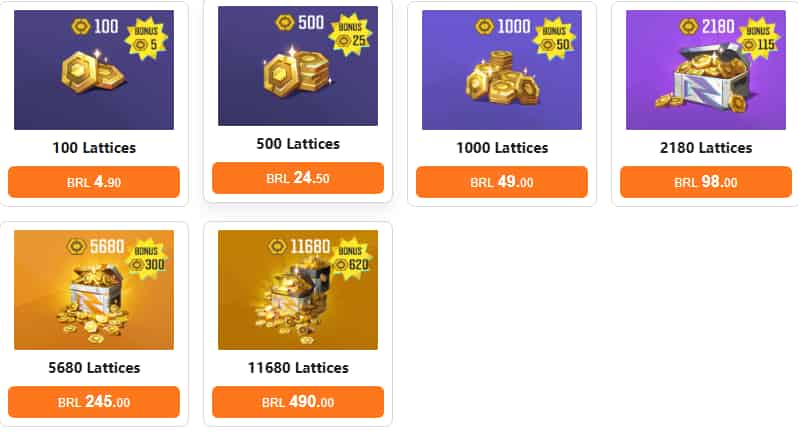
Supported Payment Methods:
- Credit/Debit cards
- Platform wallets (Steam Wallet, PSN, Xbox)
- PayPal and other local options (varies by region)
Platform Considerations:
- Purchases are often platform-locked.
- Regional pricing can vary significantly.
- Cross-progression/account linking is available, but some purchase restrictions may apply across platforms.
Step-by-Step: How to Top Up Marvel Rivals (Official)
- Launch Marvel Rivals on your platform (Steam, PS5, Xbox, etc.).
- Go to the in-game Shop tab.
- Select the Lattice pack or bundle you want.
- Choose your payment method and complete the purchase.
- The Lattice is added directly to your account — check your wallet or inventory.
Tip: Ensure the Steam Overlay (or equivalent) is enabled if you encounter purchase issues on PC.
Can You Top Up Marvel Rivals with Third-Party Sites?
Yes, reputable third-party top-up sites (like TOPUPlive) offer Lattice top-ups, often at a discount compared to official stores. These services typically work by you providing your Player ID/UID, and they credit Lattice directly to your account.
Pros:
- Potential savings (discounts up to 20%+ on some sites due to regional pricing or promotions).
- Convenient payment options (including methods not always available officially).
Risks & Considerations:
- Account security: Only use trusted sites with good reviews.
- Potential for scams or delayed delivery.
- While buying currency itself is generally not bannable, always avoid sharing login credentials.
Recommendation:
Stick to well-established platforms with strong Trustpilot scores, secure payments (SSL), and buyer protection. Compare prices but prioritize safety.
Check Marvel Rival top up discount
100 Lattices
All In One Bundle
500 Lattices
1000 Lattices
👉See also: Is TOPUPlive Legit?
Tips to Save Money on Marvel Rivals Top Ups
- Watch for Sales: Steam, PSN, and Xbox often run discounts.
- Compare Regional Pricing: Prices vary by region — some players use legitimate regional options (via trusted top-up services).
- Bundles & Starter Packs: Often better value than single purchases.
- Battle Pass Value: The pass offers good ROI through rewards and some Lattice/Units returns.
- Small Top-Ups: Marvel Rivals has low entry options (e.g., $0.99 packs), making it easy to test.
Is It Safe to Top Up Marvel Rivals?
- Official Stores: Completely safe and recommended for most players.
- Third-Party Sites: Can be safe if you choose reputable providers with transparent processes, payment protection, and positive user feedback. Avoid any site asking for your full login/password.
- General Advice: Use strong account security (2FA), never share credentials, and start with small purchases to test a site.
NetEase has a strong stance against cheats and unauthorized modifications, but standard currency top-ups do not fall into that category.
FAQs About Marvel Rivals Top Up
1. Is Marvel Rivals free to play?
Yes, the core game is free. Cosmetics and the Battle Pass are optional.
2. Does Marvel Rivals have a Battle Pass?
Yes — the Luxury Battle Pass offers premium rewards and can be purchased with Lattice.
3. What is the best value top-up pack?
Larger packs and bundles usually offer better value. Check current promotions on official stores or trusted top-up sites.
4. Can I transfer Marvel Rivals currency between platforms?
Currency is tied to your account. With account linking/cross-progression, your cosmetics and progress generally carry over, but some platform-specific purchase rules may apply.
5. How do I find my Player ID for third-party top-up?
Usually available in your account settings, profile, or via the NetEase Launcher.
Conclusion
Topping up in Marvel Rivals is straightforward and enhances your enjoyment with beautiful skins and battle pass rewards. The official in-game/store method remains the safest choice for most players, while trusted third-party sites like TOPUPlive can offer better prices and flexibility when used carefully.
Focus on what brings you joy — whether that’s collecting your favorite hero skins or supporting the battle pass. Always prioritize secure transactions and enjoy the game!

Lucy Lauria
Game writer
I spend most of my time exploring game worlds, testing new features, and learning how different systems work. Through my writing, I aim to share useful insights, helpful strategies, and clear guides that make games more enjoyable for everyone.

Related products

Related News

Last War Survival Top Up: Best Way to Buy Packs, Diamonds, and Gift Codes
Last War Gold Bricks Guide: How to Get, Use, and Buy Gold Bricks Safely
Best Last War Packs to Buy: Complete Guide + Where to Get Them Cheaper
5 Best Last War Survival Top-Up Centers: Where to Get the Best Deals and Secure Recharges
AFK Journey Marene Guide: Skills, Best Teams, Build & Is She Worth Pulling?
Arena Breakout Season 14 Preview: C2S0 Release Date, New Contents and More
Honor of Kings 11th Anniversary Guide: Rewards, Free Skins, and Events
AFK Journey Baden Guide: Skills, Best Teams, Build & Is He Worth Pulling?


