



Kingshot Kingdom Transfer Guide: How to Migrate Successfully

2026-07-23 17:01:41
Are you stuck in a dead server or looking for a more competitive alliance to dominate the Dragon Campaign? The Kingshot Kingdom Transfer event is your golden ticket to a fresh start. This cross-server migration event allows players to move their entire account progress to a new kingdom within their predetermined transfer group.
However, failing to prepare for this permanent move can leave you stranded or wasting valuable resources. This comprehensive guide covers everything you need to know about transfer requirements, ticket costs, event phases, and how to execute a flawless migration.
▍What is the Kingshot Kingdom Transfer Event?
The Kingshot Kingdom Transfer is a recurring in-game event that opens roughly every 30 to 60 days. It creates a competitive reshuffle, allowing active players to unite, alliances to merge across boundaries, and solo players to find healthier environments.
Before you pack your bags, remember that all transfers are permanent. You cannot undo a migration, and once you successfully execute a transfer, you must wait until the next official event window opens to migrate again.
▍Kingshot Kingdom Transfer Core Requirements
You cannot simply transfer on a whim. Kingshot enforces strict account safety and balance rules. Before the transfer portal opens, ensure your account meets the following checklist:
- Recall All Marches: Every squad, worker, and march must be safely inside your Town Center. No active battles or gathering deployments are allowed.
- Leave Your Alliance: You must be completely guildless. Exit your current alliance before hitting the transfer button.
- Town Center Level: Your Town Center must meet the minimum tier level required by your destination transfer group.
- Power Limits & Caps: Standard target kingdoms enforce a hard power cap, usually set at 125M power. If your power exceeds the target server's cap, you will be blocked from migrating until you lower it.
▍3 Event Phases in Kingshot Kingdom Transfer
The entire migration event spans 7 days. Missing a phase timeline can mean losing your slot entirely due to strict server population quotas. Use this detailed timeline to plan your alliance move:
Phase | Event Step | Duration | System Changes | Player Objectives & Actions |
|---|---|---|---|---|
Phase 1 | Pre-Transfer | ~2 Days | Server group brackets are unlocked globally | Check your group list to see eligible target servers |
Phase 2 | Preview Phase | ~3 Days | Kingdom ratings and individual power caps go live | Scout target activity metrics and negotiate with local leaders |
Phase 3 | Transfer Open | 1–2 Days | Portal opens for 30–60 day cycle migration; countdown starts | Execute the move manually before server quotas fill up |
▍How Much Does it Cost? Transfer Passes & Destination Rules
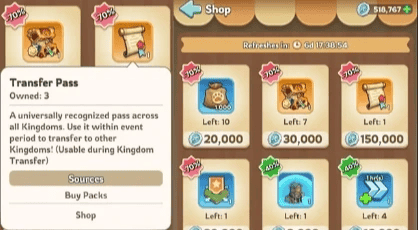
The cost of moving your account is dynamic. It is calculated using a hidden "Transfer Score" (core stats and gear, excluding bloated troop padding) relative to the destination server's average strength. The base cost ranges from 1 to 50 Transfer Passes.
Depending on your destination's activity level, different resource rules apply:
Kingdom Status | Ticket Cost Range | Premium Currency Needed? | Quota Limitations | Best Suited For |
|---|---|---|---|---|
Normal Kingdoms | 1 – 50 Passes | No extra fee | Strict server-side cap | Balanced growth & casual play |
Popular Kingdoms | 1 – 50 Passes | Yes (Exclusive Coins) | First-come, first-served | Competitive Dragon Campaigns |
VIP / Top 100 Whales | Dynamic Pass Fee | Yes (For Popular destinations) | Bypasses standard server quotas | High-spend players and rally leaders |
▍How to Get More Transfer Passes Fast
Because high-power accounts require dozens of tickets, stockpiling passes early is essential for F2P and low-spend players alike.
- The Alliance Shop: You can purchase 1 Transfer Pass per week using alliance honor currency. Buy this every single week, even if you don't plan on moving soon.
- In-Game Store Bundles: Real-money bundles offer the fastest shortcut. The introductory $5 transfer pack provides a good value, but prices scale up steeply for higher purchase tiers during the event.
- Smart Budgeting Tip: Purchasing premium packs directly in-game can quickly become expensive. Using a trusted third-party platform like TOPUPlive allows you to stock up on Transfer Packs and Exclusive Coins for a fraction of the standard retail price, ensuring you don't break the bank during the migration rush.
>> topupliveblog << for an extra deal!
▍Pro-Tips for a Successful Kingshot Kingdom Transfer
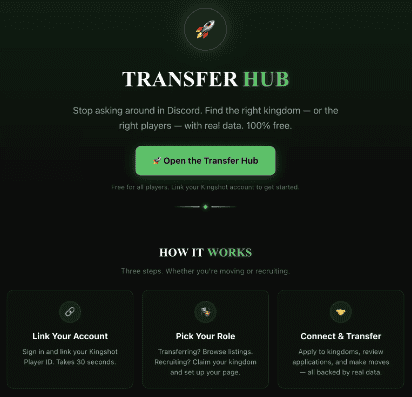
1. Scout Ahead: Use community mapping resources like the Kingshot Transfer Hub to check server histories, ruling alliances, and language barriers before committing.
2. Contact Target Leaders: Reach out to the top alliance leaders in your target kingdom during the Preview Phase. Securing an invite ensures you won't get targeted or wiped upon arrival.
3. Trim Excess Power: If you are just a few million power over a kingdom's cap, lose some T1–T3 troops in battles or dismiss them to fit under the radar.
▍FAQs About Kingshot Kingdom Transfer
1. What happens to my resources (RSS) when I transfer?
Your protected resources will safely move with you. However, unprotected resources that exceed your warehouse storage limits may be permanently lost during the migration. Be sure to use or donate your excess RSS before moving.
2. Will I lose my items, heroes, and gear progress?
No. All your unlocked heroes, equipment, research progress, and items stored in your inventory will remain completely intact.
3. How often can I transfer my account?
The event recurs every 30 to 60 days. However, once you successfully execute a transfer, you must wait until the next official event window opens to migrate again.
4. Can I transfer to a younger, newer server?
No. To maintain game balance, players can generally only transfer to servers that are older than or equal in age to their current server. You cannot bring a high-power end-game account into a newly established kingdom.
5. Is there a safe way to buy premium packs for Exclusive Coins?
Yes. If you need to top up your account to afford the "Popular Kingdom" Exclusive Coin fees, you can use TOPUPlive. It is a highly recommended third-party recharge platform that offers secure transactions and cheaper regional pricing for global gamers.
▍Conclusion
The Kingshot Kingdom Transfer is the ultimate tool to revitalize your gaming experience, whether you are seeking glory in a top-tier alliance or a peaceful home to grow. Success relies entirely on early preparation: calculate your Transfer Score, gather your Transfer Passes ahead of time, and negotiate with your target server during the Preview Phase.
👇 Read more Kingshot news here:
By managing your resources wisely and utilizing platforms like TOPUPlive for quick and affordable Kingshot Top Up , you can ensure a smooth, affordable transition to your new home.

Bob Black
game writer
I’m a gaming writer who enjoys breaking down complex game systems into clear, easy-to-understand guides. I like exploring new updates, analyzing mechanics, and turning complicated information into practical tips that players can actually use.

Related News

Last War Survival Top Up: Best Way to Buy Packs, Diamonds, and Gift Codes
Last War Gold Bricks Guide: How to Get, Use, and Buy Gold Bricks Safely
Best Last War Packs to Buy: Complete Guide + Where to Get Them Cheaper
5 Best Last War Survival Top-Up Centers: Where to Get the Best Deals and Secure Recharges
AFK Journey Marene Guide: Skills, Best Teams, Build & Is She Worth Pulling?
Arena Breakout Season 14 Preview: C2S0 Release Date, New Contents and More
Honor of Kings 11th Anniversary Guide: Rewards, Free Skins, and Events
AFK Journey Baden Guide: Skills, Best Teams, Build & Is He Worth Pulling?


