



How to Hide Wires in Once Human Mobile: 2026 Guide

2026-08-31 11:41:17
Building a base in Once Human Mobile can quickly leave you with a mess of electrical wires and water pipes. Once you connect generators, production facilities, water systems, and other equipment, those lines can make an otherwise polished territory look cluttered. Fortunately, you can hide wires and pipes without disconnecting them. If you're wondering how to hide wires in Once Human Mobile, here's the quickest way to do it in the current version.
If you're looking for safe and affordable way to purchase Once Human resources, you can also check out the Once Human top-up options on TOPUPlive.



Umbral Weaver Crate

Chained Eclipse Crate

120 Draws Guaranteed Bundle-Bone Path

All Pack

How to Hide Wires and Pipes in Once Human Mobile
The wire and pipe visibility system has changed since the earlier versions of Once Human. The old Build Mode shortcut is no longer the main way to control their visibility. Following the January 2026 updates, the relevant controls were moved into the game's settings, while the updated Build Modes also provide cleaner views for construction and utility management.
Follow these steps:
Step 1: Open the Settings Menu
Launch Once Human Mobile and enter your territory.
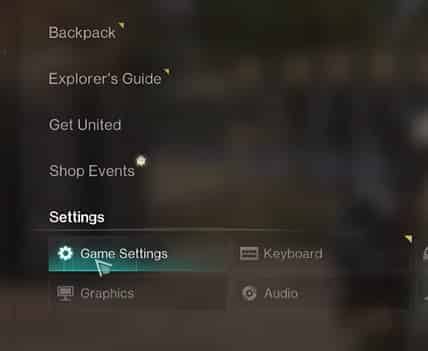
Tap the Menu button to open the game's system menu, then select Settings.
Step 2: Open Game Settings
Look for Game Settings or the section related to Game Mode.
The exact wording and menu layout may vary slightly between versions or platforms, so don't worry if the option isn't named exactly the same on your device.
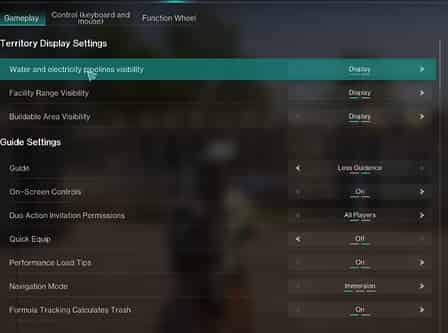
Step 3: Find the Wire and Pipe Visibility Option
Step 4: Set the Display to Hidden
Change the option from Display/Show to Hidden.
Once the setting is applied, your electrical wires and water pipes should no longer clutter your view.
You can return to the same setting and switch them back on whenever you need to inspect your connections.
Why Can't I Hide Wires in Build Mode Anymore?
In January 2026, Once Human introduced a revamped construction system with several dedicated Build Modes. Standard Build Mode hides distractions such as pipes and wires so you can focus on the structure, while Utility Management Mode is designed specifically for connecting and removing pipes and wires.
So if you're looking for the old visibility button and can't find it, your game isn't necessarily bugged—the interface has changed.
Does Hiding Wires Remove Them?
No.
Hiding wires and pipes is a visual setting. It does not disconnect your equipment or remove the utility network.
Your generators, machines, water systems, and other connected facilities will continue to work as long as the connections themselves are functioning.
When troubleshooting a power or water problem, simply turn the visibility back on so you can inspect the connections.
Can Other Players See My Hidden Wires?
Hiding wires is primarily a visual convenience rather than a way to physically remove them from your territory.
Historically, Once Human's wire and pipe visibility settings have been client-side: players could hide connections from their own view while visitors could still see them. Community reports have specifically noted this behavior.
So don't treat the hide option as a replacement for proper cable management if you want your base to look clean to everyone who visits.
How to Make Wires and Pipes Less Messy
Hiding the connections is the easiest solution, but a little planning can make your territory look better even when they're visible.
Keep Generators Close to Power-Hungry Facilities
Place generators near the machines that use the most electricity whenever possible. Shorter connections are easier to organize and troubleshoot.
Run Wires Behind Structures
Walls and floors can help conceal connections. Since wires can be routed through building structures, you have more flexibility than simply running every cable across an open room.
Group Similar Facilities Together
Keep generators, production machines, water equipment, and other related facilities in dedicated areas. This reduces the number of long connections crossing your base.
Use Utility Management Mode
When you need to connect or remove wires and pipes, use the dedicated Utility Management Mode. The January 2026 construction update added this mode specifically for utility connections, with a cleaner view that focuses on relevant pipes, wires, and facilities.
Turn Visibility Back On When Troubleshooting
If a machine suddenly stops working, don't immediately rebuild your setup.
First, show your wires and pipes again and check:
- Whether the facility is connected
- Whether the generator has enough power
- Whether the water system is connected correctly
- Whether a wire or pipe was accidentally removed
Once everything is working, hide the connections again.
How to Remove or Reconnect Wires on Once Human Mobile
Hiding wires is different from removing them.
If you need to change your setup:
- Enter Build Mode.
- Open Utility Management Mode if available.
- Select the relevant power or water facility.
- Connect the required wire or pipe.
- To remove a connection, select the existing wire or pipe and use the appropriate remove/disconnect option.
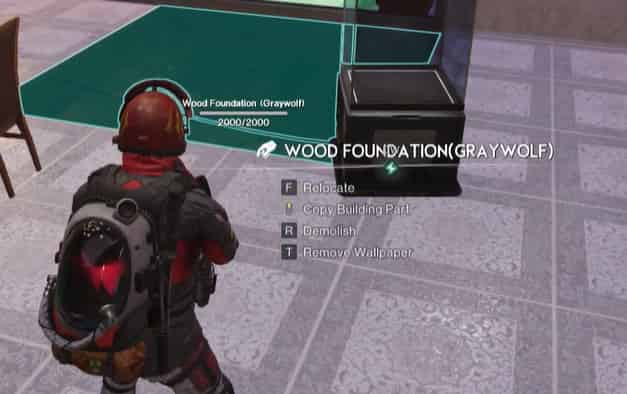
The updated utility management system is designed to make these connections easier to select and manage.
Once Human Mobile Wire Visibility: Quick Answer
How do you hide wires in Once Human Mobile?
Open Settings, find the relevant Game Settings/Game Mode option for water and electrical wire or pipe visibility, and change it from Show/Display to Hidden. The location of this setting changed with the January 2026 updates, so the old Build Mode shortcut may no longer work.
If you need to work on your connections, turn the visibility back on or use Utility Management Mode to get a clearer view of your wires and pipes.
Final Tips for a Cleaner Once Human Base
You don't need to rebuild your entire territory just because your wires look messy. A simple combination of good facility placement, hidden routing, and the wire visibility setting can make a big difference.
And when you need more resources for building, crafting, or progressing through Once Human, make sure you have enough in-game currency and items on hand. You can purchase the crystgin from official store or trusted third-party platforms like TOPUPlive. Keep those wires hidden, keep your connections working, and keep building, Metas!

Lucy Lauria
Game writer
I spend most of my time exploring game worlds, testing new features, and learning how different systems work. Through my writing, I aim to share useful insights, helpful strategies, and clear guides that make games more enjoyable for everyone.


Related products

Related News

Last War Survival Top Up: Best Way to Buy Packs, Diamonds, and Gift Codes
Last War Gold Bricks Guide: How to Get, Use, and Buy Gold Bricks Safely
Best Last War Packs to Buy: Complete Guide + Where to Get Them Cheaper
5 Best Last War Survival Top-Up Centers: Where to Get the Best Deals and Secure Recharges
AFK Journey Marene Guide: Skills, Best Teams, Build & Is She Worth Pulling?
Arena Breakout Season 14 Preview: C2S0 Release Date, New Contents and More
Honor of Kings 11th Anniversary Guide: Rewards, Free Skins, and Events
AFK Journey Baden Guide: Skills, Best Teams, Build & Is He Worth Pulling?


