



Honor of Kings Gifting Guide: How to Gift Skins & Boost Nobility

2026-09-18 17:52:45
Gifting skins in Honor of Kings is a great way to surprise friends and boost your own Nobility rank at the same time. This guide shows you exactly how to gift skins, the requirements you need, whether gifting increases your Noble rank, and what to do when the gift option is greyed out.
Ready to start gifting? Top up HOK Tokens on TOPUPlive at a better price and surprise your teammates today.



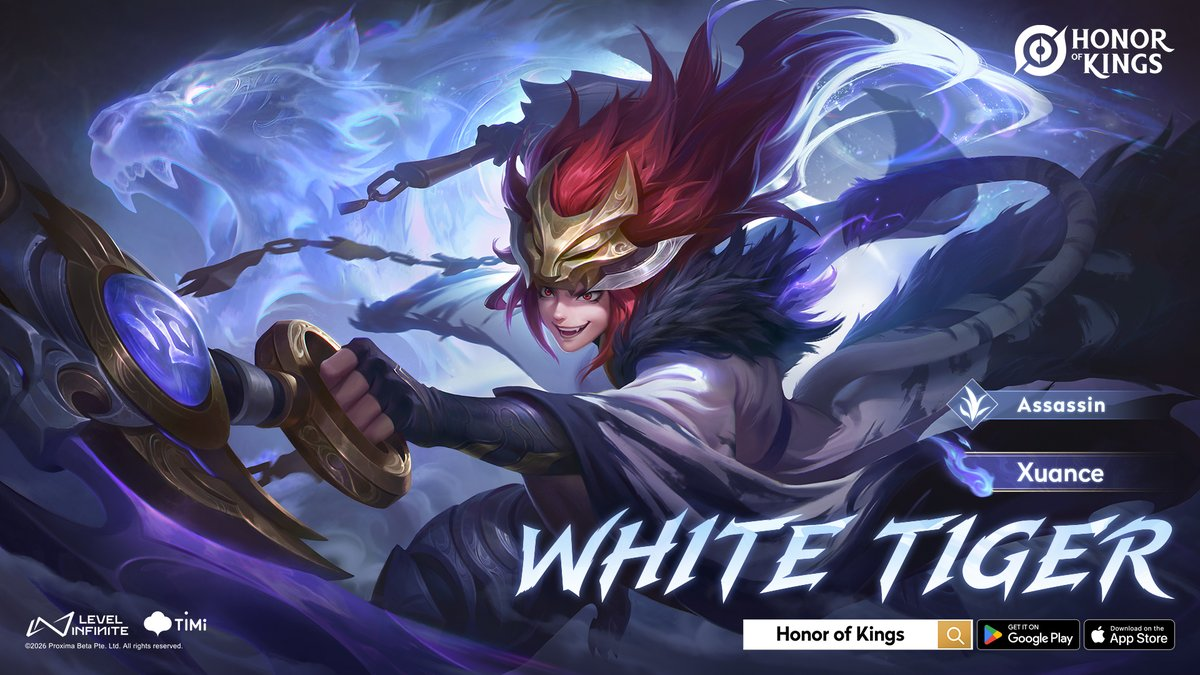
10 Draws White Tiger Xuance Limited skin
40 Draws Surging Arrows Garo Skin
20 Draws Ming - Phantom Web Skin
40 Draws Li Xin - Pride And Justice Skin
Prerequisites for Gifting Skins
Before you can send a skin, make sure you meet these conditions:
- Noble Rank: You need at least Noble Level 3 for basic gifting (usually limited to about 3 gifts per day).
- Noble Level 5 unlocks limited skins.
- Noble Level 8 unlocks rarer skins.
- Friendship: The recipient must be on your in-game friends list. Newly added friends may have a short waiting period in some cases.
- Same Server/Region: Gifting only works between players on the same server (e.g., both on America, Europe, Asia, etc.). Cross-region gifting is not allowed.
- Tokens: You need enough Honor of Kings Tokens (the premium currency). Glory Coins cannot be used for gifting.
- Giftable Skin: Only skins currently available in the shop can usually be gifted. Many event, gacha, or exclusive limited skins cannot be gifted. You also cannot gift a skin the friend already owns (it may convert to fragments or similar in some cases).
Tip: Higher Noble ranks give better daily gift limits and unlock more skin options, so climbing the rank is worthwhile.
How to Gift Skins in Honor of Kings (Step-by-Step)
There are a few easy ways to send a gift. Here are the most common methods:
Method 1: From a Friend’s Profile (Fastest)
- Open Honor of Kings and go to the main lobby.
- Open your friends list and select the friend you want to gift.
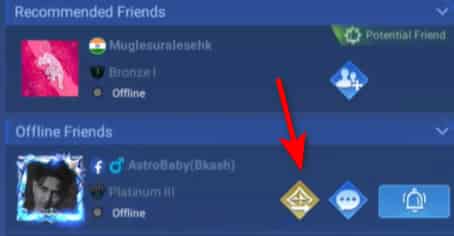
Tap the gift icon on their profile.
Browse or search for the desired skin.
Select the skin, optionally add a message/blessing, and confirm.
Pay with Tokens. The skin will be sent (usually appears in the friend’s mail or inventory).
Method 2: Via Shop > Gift Center
- From the main lobby, open the Shop.
- Look for the Gifts option (often at the bottom or side).
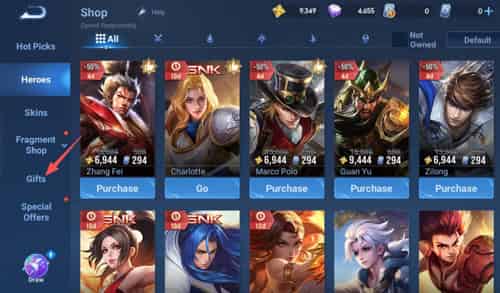
Browse available skins.
Select the skin you want to gift → choose “Gift to Friend” (or similar).
Pick your friend from the list.
Confirm and pay with Tokens.
Method 3: Directly from Skin Purchase Screen
- Go to the Shop and find the skin.
- Instead of “Buy”, select the “Gift to Friend” option if available.
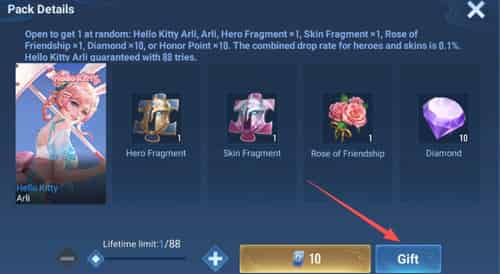
Choose the friend and complete the payment.
Important notes:
- Double-check the friend’s UID/name and server before confirming.
- The gift is usually delivered quickly via in-game mail. Ask your friend to check their mailbox.
- Daily limits apply (commonly 3 gifts at Noble 3).
Does Gifting Skins Increase Your Nobility Rank?
Yes. Spending Tokens on skins (whether you buy them for yourself or gift them to friends) counts as Token spending. In the Nobility system, 1 Token spent generally equals 1 Nobility Point. This means gifting is a valid and popular way to raise your Noble rank, especially if you’ve already bought most of the skins you want for yourself.
Note: Limited-time Tokens usually do not contribute to Nobility points. Regular Tokens do. Higher Noble ranks unlock better rewards, exclusive items, visual effects, higher gift limits, and more social prestige. Many players gift strategically to push toward higher ranks (e.g., Noble 5, 8, or 10).
Why Can’t I Gift Skins in Honor of Kings? (Troubleshooting)
If the gift option is greyed out or the transaction fails, check these common reasons:
Problem | Solution |
|---|---|
Not high enough Noble rank | Reach at least Noble Level 3 (higher for limited/rare skins) |
Not friends / friendship too new | Add the player as a friend and wait if required |
Different servers/regions | Both players must be on the same server |
Not enough Tokens | Top up Tokens (see HOK top up guide) |
Skin not giftable | Choose a regular shop skin; event/gacha skins often cannot be gifted |
Daily gift limit reached | Wait until the next day or raise your Noble rank |
Friend already owns the skin | System usually blocks it or converts it |
Technical issue | Restart the game, check internet, or contact support |
Most “I can’t gift” issues are solved by checking Noble rank + same server + sufficient Tokens.
Extra Tips for Smart Gifting
- Focus on popular or highly requested skins for maximum appreciation.
- Use gifting during events or birthdays for extra impact.
- Plan your Token spending: gifting helps both your friend and your own Nobility progress.
- Always confirm the friend’s server and UID to avoid mistakes (gifts are usually non-refundable).
How to Get Tokens for Gifting on TOPUPlive
Tokens are required for every skin gift. For safe, fast, and discounted top-ups, use TOPUPlive, a trusted game top-up site.
Current popular Token packages (USD prices, subject to change):
Tokens | Original Price | TOPUPlive Price |
|---|---|---|
80 Tokens | $0.99 | $0.92 |
240 Tokens | $2.99 | $2.63 |
400 Tokens | $4.99 | $4.52 |
560 Tokens | $6.99 | $6.19 |
800 + 30 Tokens | $9.99 | $8.55 |
1200 + 45 Tokens | $14.99 | $12.87 |
>> Check live Honor of Kings top-up prices on TOPUPlive
10 Draws White Tiger Xuance Limited skin
40 Draws Surging Arrows Garo Skin
20 Draws Ming - Phantom Web Skin
40 Draws Li Xin - Pride And Justice Skin
👉See also: Is TOPUPlive Legit?
Larger packages and other options (including skin packs and passes) are also available. First-time top-ups may qualify for extra bonuses (up to 100% in some cases, based on in-game distribution).
How to top up Tokens on TOPUPlive:
- Visit https://www.topuplive.com/honor-of-kings/.
- Select the Token package you want.
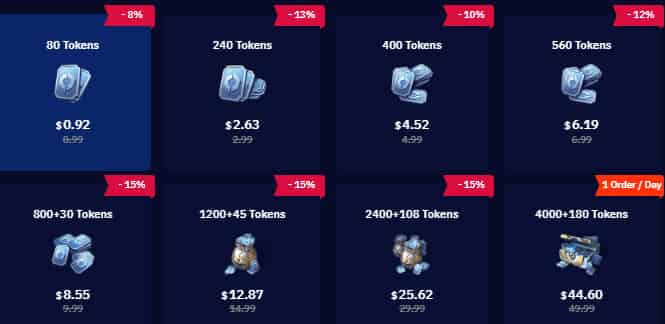
3. Enter your UID (found in Settings → UID after tapping your avatar).
4. Choose your payment method and complete the order.
5. Tokens are usually credited within a few minutes.
TOPUPlive offers competitive discounts (up to around 15% or more on common packs), multiple payment options, and reliable delivery, making it easier to keep gifting and climbing your Noble rank.
FAQs About Honor of Kings Gifting
1. Can I gift skins to someone who is not my friend?
No. Gifting is limited to friends on the same server.
2. Can I gift across different regions (e.g., America to Europe)?
No.
3. Do I need to own the hero to gift its skin?
Generally no for many skins, but check the specific item.
4. What happens if my friend already has the skin?
The gift is usually blocked or converted into fragments/currency.
5. Is there a limit on how many skins I can gift per day?
Yes. At Noble Level 3 it is commonly around 3 gifts per day. Higher ranks may increase this.
6. Does buying Tokens directly increase Nobility, or only spending them?
You need to spend the Tokens (on skins, gifts, etc.) to gain Nobility points.
Conclusion
Gifting in Honor of Kings is straightforward once you meet the requirements, and it benefits both you and your friends. Reach Noble Level 3, stay on the same server as your friends, keep Tokens ready, and start sending those stylish skins.
Learn how to gift skins step-by-step, whether gifting boosts Nobility rank, common reasons you can’t gift, and where to top up Tokens cheaply on TOPUPlive. Ready to gift? Top up your Tokens safely and at a better price on TOPUPlive, then surprise your teammates today!
>>Use topupliveblog to Save More <<

Lucy Lauria
Game writer
I spend most of my time exploring game worlds, testing new features, and learning how different systems work. Through my writing, I aim to share useful insights, helpful strategies, and clear guides that make games more enjoyable for everyone.
Related products
Related News

Once Human Gifting Guide: How to Gift Cosmetics, Blueprints & Items
VALORANT Gifting Guide: How to Gift Skins, Bundles & VP to Friends
Once Human Version 3.0.6 Update: Beast Riding, Server Merges, Isles of Abyss & More
PUBG MOBILE Ocean Odyssey Guide: Back to the Deep
Foundation: Galactic Frontier Season 2: The Usurper – Release Date, Story, Features & Events
Sausage Man SS25 Season Update: Create & Destroy Release Date, New Weapons, Season Pass & More
Delta Force Loot Guide: Valuable Items and Loot Priorities
Arena Breakout: Infinite Season 7 Weapon Tier List: Which Guns Should You Use?


