



Free Fire Gifting Guide: How to Send Diamonds, Skins & Booyah Pass

2026-09-24 14:46:10
Gifting in Free Fire is a simple way to support friends with skins, bundles, the Booyah Pass, or diamonds. This guide shows you exactly how to send and claim gifts the right way.
Ready to surprise a friend? Grab their Player ID and top up diamonds instantly on TOPUPlive.



110 Diamonds



Booyah Pass Card
Monthly Membership
Weekly Lite
What You Can (and Cannot) Gift in Free Fire
You can gift a wide range of items through the in-game store, including:
- Fashion items and outfits
- Character skins and bundles
- Weapon skins
- Pets, emotes, and collection items
- Booyah Pass (season pass)
Important limitations:
- You cannot directly transfer diamonds or gold from your own account to another player inside the game.
- Most gifts require you and the recipient to be friends (or at least on the same region server).
- Gifts are irreversible — always double-check the Player ID.
- Some premium items (like the Booyah Pass) may require entering the Player ID manually.
How to Gift In-Game Items (Skins, Bundles, Booyah Pass, etc.)
This is the classic “gift someone on Free Fire” method:
- Open Free Fire and go to the Store.
- Tap the Gift tab.
- Browse the available categories (Fashion, Bundle, Character, Weapon, Collection, etc.).
- Select the item you want to send.
- Tap Give.
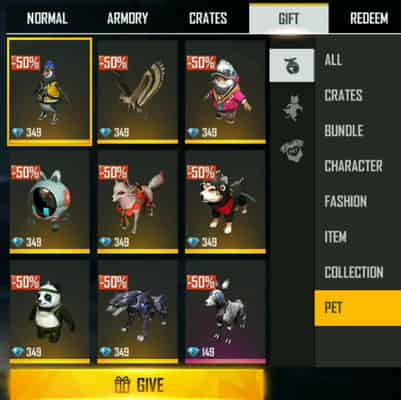
6. Choose your friend from the list or enter their Player ID.
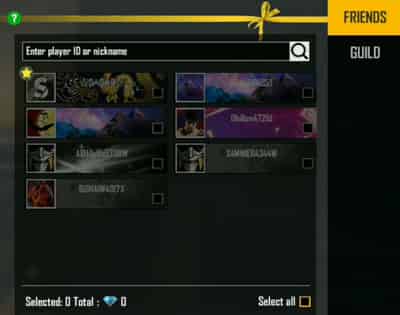
7. (Optional) Add a short message.
8. Confirm and pay with your diamonds.
The gift is sent instantly and appears in the recipient’s in-game mailbox.
Tip: Make sure you have enough diamonds in your own account before starting. Some limited or high-value items can only be gifted during specific events.
How to Gift Diamonds in Free Fire
Since Free Fire does not allow direct diamond transfers, the safest and most popular method is to top up Free Fire diamonds directly onto your friend’s account using their Player ID.
Here’s the simplest way:
1. Ask your friend for their Free Fire Player ID (UID). You can find it on their profile page.
2. Visit a trusted third-party top-up platform such as TOPUPlive.
3. Select Free Fire and enter the Player ID.
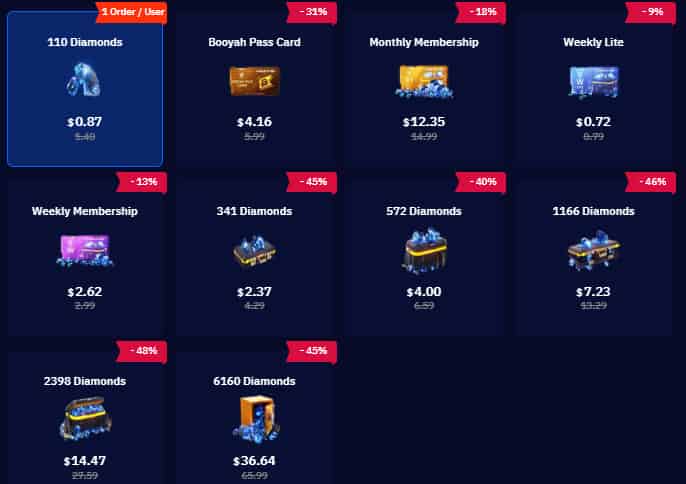
4. Choose the diamond package you want to gift.
5. Complete the payment.
The diamonds usually arrive in the friend’s account within a few minutes. No password or login is required — only the Player ID.
Many players prefer TOPUPlive for gifting diamonds for its fast delivery, competitive prices and bonuses, secure process that only needs the Player ID, and it works even if you’re not friends in-game.
Some Diamond Packages on TOPUPlive
Package | Original Price | TOPUPlive Price | Discount |
|---|---|---|---|
110 Diamonds | $1.40 | $0.87 | -31% |
341 Diamonds | $4.29 | $2.37 | -40% |
572 Diamonds | $6.59 | $4.00 | -46% |
1166 Diamonds | $13.29 | $7.23 | -48% |
2398 Diamonds | $27.59 | $14.47 | -45% |
6160 Diamonds | $65.99 | $36.64 | — |
>> Check live Free Fire top up options on TOPUPlive
110 Diamonds
Booyah Pass Card
Monthly Membership
Weekly Lite
👉See also: Is TOPUPlive Legit?
Can You Send Gifts Without Diamonds?
Many players search for ways to “send gift in Free Fire without diamond.”
Here’s the reality: There is no way to send Free Free gift without diamonds.
- Almost all regular in-game gifts require diamonds on the sender’s side.
- There are occasional exceptions (certain gold-priced items or special limited-time events), but these are rare.
- You cannot freely gift valuable skins or the Booyah Pass without spending diamonds or real money.
Practical alternatives
if you don’t want to use your own diamonds:
- Top up Free Fire diamonds directly to your friend’s ID (the method above).
- Send a Google Play or App Store gift card so they can buy what they want.
- Wait for official Free Fire events that allow free or discounted gifting.
Avoid any websites or apps that claim you can send unlimited free gifts or diamonds — these are almost always scams.
How to Claim Gifts
- In-game item gifts → Open the Mailbox (envelope icon) and claim the item.
- Diamond top-ups → Diamonds appear automatically in the recipient’s diamond balance (usually within minutes).
Tips for recipients:
- Keep some free space in your mailbox.
- Log in regularly so you don’t miss time-limited gifts.
- If diamonds don’t arrive quickly, double-check the Player ID that was used.
Extra Tips & Common Issues for Free Fire Gifting
- Always verify the Player ID carefully before purchasing.
- Gifts generally only work within the same region.
- If the “Gift” option is missing, the item may not be giftable, or friendship/level requirements haven’t been met.
- Booyah Pass can usually be gifted by selecting it in the Gift shop and entering the Player ID.
- Never share your account password with anyone — legitimate top-up sites never ask for it.
Conclusion
Gifting in Free Fire is simple once you understand the two main paths: Use the in-game Gift tab for skins, bundles, and the Booyah Pass and use a reliable top-up service like TOPUPlive to send diamonds directly via Player ID. Both methods are safe when done correctly. The Free Fire diamond top-up route is especially convenient when you just want to give your friend the freedom to buy whatever they like. Read more about Free Fire Top Up Guide.
Ready to surprise a friend? Grab their Player ID and head over to TOPUPlive to send diamonds in just a few clicks.

Lucy Lauria
Game writer
I spend most of my time exploring game worlds, testing new features, and learning how different systems work. Through my writing, I aim to share useful insights, helpful strategies, and clear guides that make games more enjoyable for everyone.
Related products
Related News

Wuthering Waves Version 3.7 Iuno Build Guide: Best Weapons, Echoes, Stats and Teams
VALORANT Champions Shanghai 2026: Everything You Need to Know
Tumile Coins Discount – Save Up to 50% on TOPUPlive
Identity V White Cat Legend Crossover Guide: Costumes, Gu Tang Return, and Professor S Skin Details
Tiles Survive Beginner Guide: Best Tips and Strategies for Fast Progression
Whiteout Survival Gift Codes (September 2026) – Latest Working Redeem Codes & Rewards
Wuthering Waves 3.7 Pull Count: How Many Free Pulls Can You Get?
NTE 1.5 Banner Leaks: New Characters Exe And Elyms


