
If you're an active user of Bigo Live, you may have heard of Bigo Families. A Bigo Family is more than just a group of users; it's a community within the app that can offer unique experiences, opportunities, and rewards. In this article, we’ll explore everything you need to know about Bigo Families, including how to join one, how to create your own, and how to manage your family’s prestige, rankings, and points.

▍What is a Bigo Family?
A Bigo Family is a group of users on Bigo Live who share similar interests or goals. Members team up to create content together, participate in exclusive family events, and unlock special privileges not available to individual users. Families foster a supportive environment where hosts and fans collaborate on multi-guest streams, compete in battles, and help each other grow.
Families are region-specific, meaning members typically need to be from the same geographic area to participate fully in events and rankings.
▍Understanding Bigo Family Rules: Combat Points, Levels, Rankings, and More
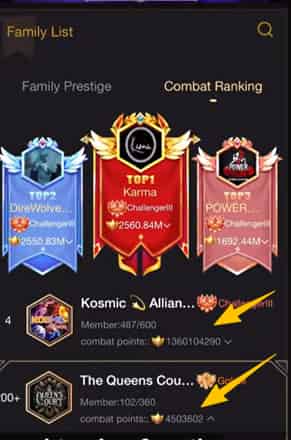
At the heart of Bigo Families is a gamified system designed to reward activity and collaboration. Everything revolves around combat points, which act as the main driver for growth and competition.
> Combat Points: The Core of Family Growth
Combat Points are the driving force behind every Bigo Family’s progress. They directly affect:
- Family Level – Determines how large and powerful your family can become
- Member Level – Reflects each member’s individual contribution
- Family Ranking (Prestige) – Shows where your family stands compared to others
- Rewards & Privileges – Higher points unlock better perks and features
In simple terms, combat points are the “currency” of success for Bigo Families.
How Families Earn Combat Points?
Combat points are earned collectively through daily activity and participation. Key sources include:
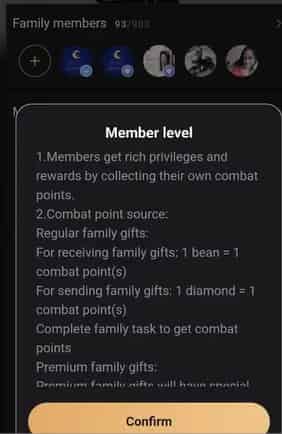
Receiving Regular Family Gifts
When family members receive designated family gifts, the family gains combat points.
- 1 bean received = 1 combat point
Sending Regular Family Gifts
When members send family gifts, this also contributes to family points.
- 1 diamond sent = 1 combat point
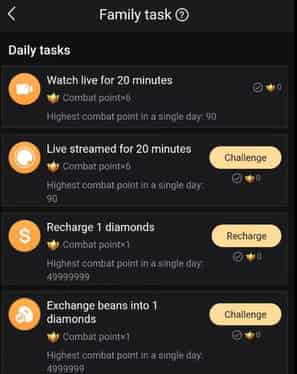
Completing Family Tasks
Bigo regularly assigns tasks that encourage activity, engagement, and teamwork.
Premium Family Gifts
These special gifts come with higher or unique combat point values. The exact values can be checked in the family gift page or gift panel within the app.
Consistent gifting and task completion are the fastest ways to boost a family’s overall strength.
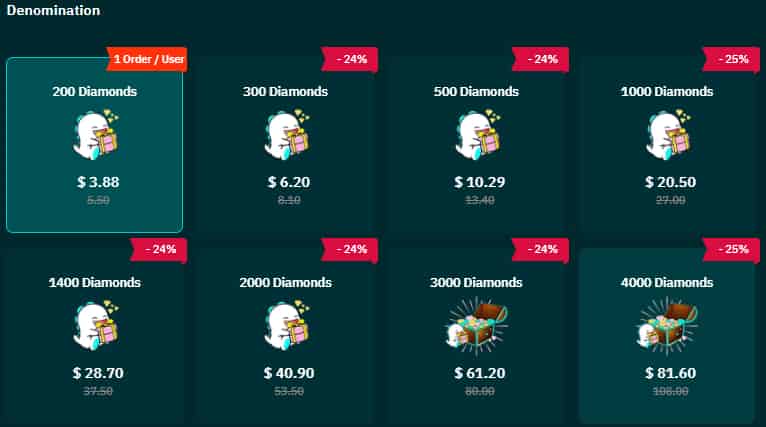
For families that rely heavily on gifting to stay competitive, some members choose cost-effective Bigo diamonds recharge options—such as third-party platforms like TOPUPlive—to support regular participation without overspending.

How Members Earn Their Own Combat Points?
Individual members also accumulate personal combat points, which affect their member level and badge progression. Members earn points by:
- Receiving family gifts
- Sending family gifts
- Completing family tasks (such as watching live streams, hosting broadcasts, or recharging their Bigo account)
The more active a member is, the faster they level up and stand out within the family.
> Family Levels and Member Levels
Family Level
Represents cumulative combat points earned by the family over time. Higher levels unlock practical benefits, such as:
- Increased member capacity.
- Exclusive features (e.g., special video frames and advanced audio settings for multi-guest rooms).
Level up by steadily accumulating family combat points through gifts, tasks, and events.
Member Level
Tracks each member's personal contributions and combat points within the family. Benefits include:
- Advanced badges (often more elaborate in higher-level families).
- Better rewards and recognition.
Badge design and sophistication depend on both your member level and the family's overall level.
> Family Ranking (Prestige): Competing Within Your Region
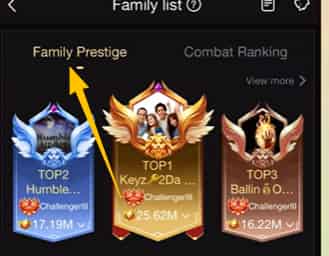
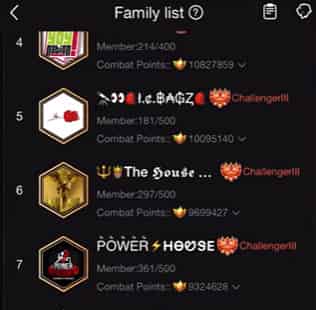
Family prestige determines how your family ranks against others in the same region.
How Rankings Are Calculated?
Rankings are based on the total combat points earned by the family or its members during a set period—usually monthly.
How to Check Your Family Ranking?
You can view your family’s ranking under your user ID in the family section or through the rotating “Family Events” banner in the app, often labeled under Family Prestige.
Monthly Reset System
The Family Monthly Prestige Ranking resets at the start of every month. This ensures fair competition and gives all families a fresh chance to climb the leaderboard, regardless of past performance.
> Target Points: Monthly Goals That Keep Families Active
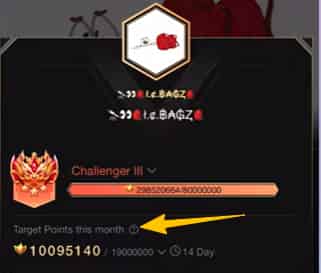
To prevent inactivity, Bigo uses a Target Point system that resets monthly.
Family Target Points
Each family receives a required target based on its current family level. If the family fails to reach this target by month’s end, its ranking may drop.
Member Target Points
Individual members also receive personal targets based on their member level. Falling short can result in lower personal rankings or reduced standing within the family.
This system reinforces one key rule: ongoing participation matters more than past achievements.
To remain competitive after each reset, many families plan their gifting and recharge strategies in advance, making steady top-ups through platforms like TOPUPlive part of their routine.
▍How to Join a Bigo Family?
Joining a Bigo Family is simple, but there are a few steps you’ll need to follow:
Search for a Family
Open the Bigo Live app and go to your profile. Tap the Family badge or navigate to the Explore/Family section. Browse available families or search for one that matches your interests.
Request to Join
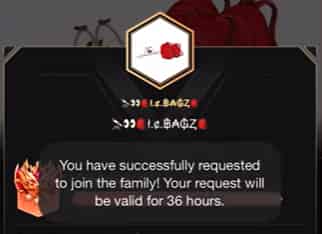
Once you’ve found a family you’d like to be a part of, send a request to join. Keep in mind that some families may have specific criteria or require approval from the family leader before you can join.

Getting Accepted
While the process is straightforward, the key to getting accepted lies in your Bigo profile. Make sure it’s active and engaging. If you’re new, participating in family-related events and contributing to the community can help boost your chances of getting accepted.
▍How to Create a Bigo Family?
Creating your own family requires more commitment and is ideal if you have a group ready to grow together:
Requirements
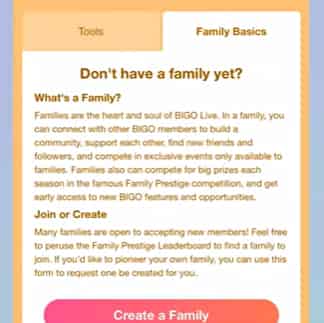
You must not be in an existing family, have a minimum of 5 initial members (all from the same region), and provide a WhatsApp-registered phone number for verification. Bigo reviews applications for authenticity—no fake accounts allowed.
Steps
Access the Family section in your profile or Explore tab. Look for the option to apply for family creation. Submit your details, and Bigo will contact you (often via WhatsApp) for approval, which can take 24-48 hours.
Post-Creation Rules
Maintain at least 10 members within 30 days and participate in at least 5 family events per month to keep the family active.
Note that some regions or creation types may involve fees or additional criteria—check the app for the latest details.
▍How to Delete a Bigo Family?
Managing a family involves appointing admins, approving joins, and organizing events to hit targets.
- Leaving a Family: As a regular member, go to your profile > Family badge > Menu (three dots) > Leave Family. Your badge will be removed immediately.
- For Leaders: You can transfer leadership to another member if you want to step down.
- Deleting/Disbanding a Family: Bigo does not offer a simple in-app disband button. If the family becomes inactive or fails ongoing requirements, it may lose status. For full deletion, the leader typically needs to transfer leadership, have members leave, or contact Bigo support directly. Some third-party services offer assisted deletion, but always prioritize official channels.
▍Conclusion
Bigo Families add depth, competition, and community to the platform. By understanding combat points, targets, levels, and rankings, you can strategically build or join a group that helps everyone thrive. Whether you're aiming for the top of the prestige leaderboard or just enjoying collaborative streams, a strong family can make all the difference on Bigo Live!