









Buy SUGO Coins with Your User ID
Top up SUGO Coins at TOPUPLive for virtual gifts and other paid features in SUGO. Choose a package, enter your SUGO User ID and complete checkout. This is a direct top-up service: you do not need to provide your SUGO account password or redeem a voucher code.
Start with 1,200 Coins or choose a larger package for your next round of gifting. Check the current package price and order total before paying, and make sure the User ID belongs to the account you want to recharge.
What Are SUGO Coins Used For?
SUGO is a social app with group voice rooms, private chats, video calls and shared moments. Virtual gifts let you celebrate a conversation or show appreciation to someone in a room.
SUGO Coins are the app's virtual currency for gifts and other paid features. Check the Coin cost and any conditions shown in the app before using them. Buying Coins adds to your balance; it does not automatically include a particular gift, medal or membership.
Choose Your SUGO Coins Package
The current selection includes the following packages. Use the product selector above to check availability and prices; select “View More” if additional options are hidden.
| Listed package | Coins represented by the package label |
| 1,200 Coins | 1,200 |
| 2,400 Coins | 2,400 |
| 6,250 Coins | 6,250 |
| 12,500 Coins | 12,500 |
| 37,500 Coins | 37,500 |
| 50,000 Coins | 50,000 |
| 65,000 Coins | 65,000 |
| 102,500 Coins | 102,500 |
| 130,000 Coins | 130,000 |
| 130,000 Coins ×2 | 260,000 |
| 130,000 Coins ×3 | 390,000 |
| 130,000 Coins ×5 | 650,000 |
The ×2, ×3 and ×5 labels identify multiples of the 130,000-Coin package, not free bonus Coins. Compare each bundle's displayed price rather than assuming a larger order always has a lower price per Coin. Confirm the package shown in your order before payment.
How to Recharge SUGO Coins on TOPUPLive
1. Select a SUGO Coins package from the available options.
2. Enter your SUGO User ID in the recharge account field.
3. Double-check the ID and selected package, then click “Buy Now.”
4. Choose an available payment method, review the final total and complete payment.
5. Check your order status and SUGO Coin balance after the order is fulfilled.
How to Find Your SUGO User ID
1. Log in to the SUGO account you want to recharge.
2. Tap “ME” in the bottom-right corner of the main screen.
3. Open “View/Edit Profile” and scroll down.
4. Find your User ID and copy it into the TOPUPLive recharge field.
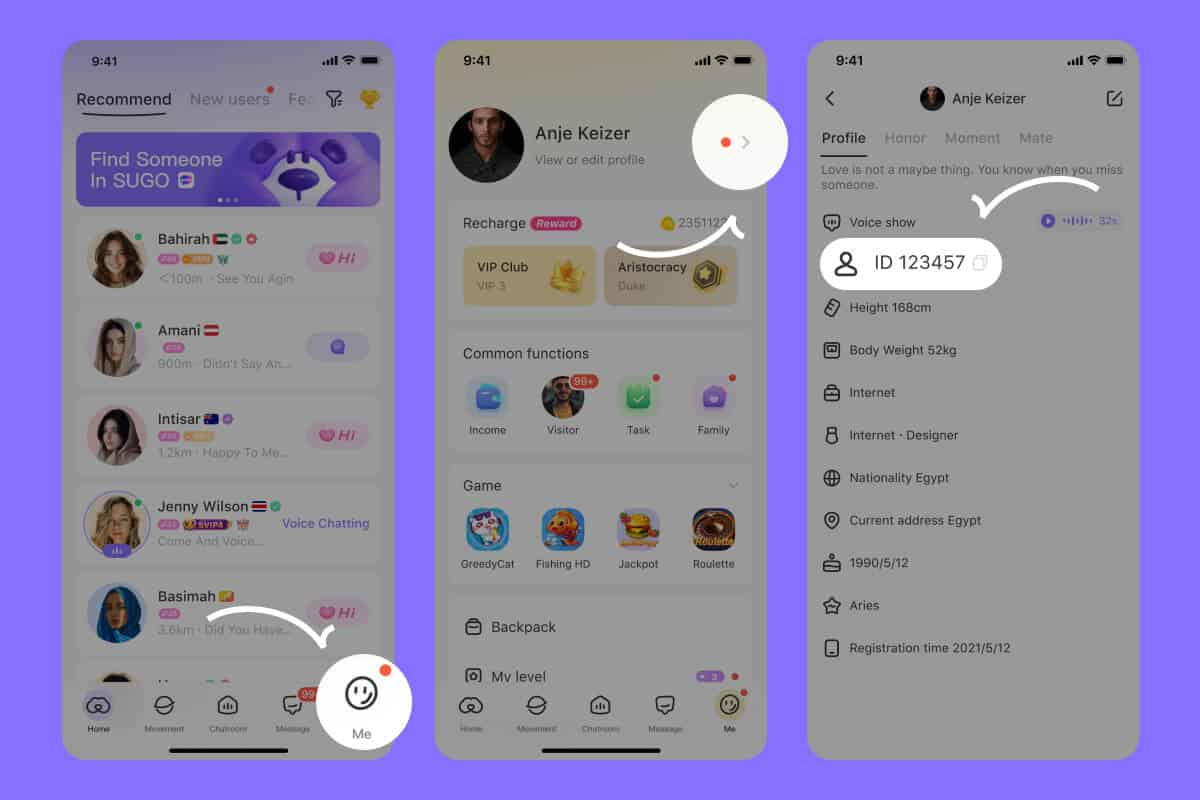
Use the User ID shown in your profile, not your display name or phone number. Menu labels may differ between app versions; if you cannot locate the ID, ask support for help before ordering.
Before You Complete Your Recharge
Keep your SUGO password private: the recharge instructions request your User ID, not access to your SUGO account. Review the selected package, payment currency and final amount so you know exactly what you are ordering.
Check availability for your country or region on the product page. If you use a different SUGO version or are unsure whether your account is supported, contact TOPUPLive support before paying. Keep your order number for any follow-up questions.
Choose your SUGO Coins package above and recharge the account you want to use for your next gift.
Do I need to share my SUGO password to buy Coins?
No. This is a User ID-based direct top-up. Enter the ID from your SUGO profile in the recharge field; you do not need to provide your SUGO password, account recovery codes or a social account login.
Are the ×2, ×3 and ×5 packages bonus Coin offers?
No. These labels refer to multiples of the 130,000-Coin package. For example, “130,000 Coins ×2” represents 260,000 Coins, not 130,000 purchased Coins plus an additional free bonus. Check the selected package and its price before paying.
Which regions and SUGO versions does this recharge support?
Check the product's availability after selecting your country or region. This page lists SUGO: Voice Live Chat Party; do not assume the same service also covers SUGO Lite or every regional version. If your account's compatibility is unclear, confirm it with TOPUPLive support before ordering.
How long does a SUGO Coins top-up take?
Coins are credited when your order is fulfilled. This page does not specify a guaranteed completion time. Check your order status after payment and refresh the app to view your balance. If you need the Coins for a time-sensitive event, ask support about current processing times before purchasing.
Which payment methods can I use to recharge SUGO?
Choose from the methods displayed at checkout for your order. Availability can depend on your country, payment currency and selected product. Review the final total and any displayed fees before confirming payment.
Can I use a discount or coupon on SUGO Coins?
Check the current offer on your selected package. If a coupon is available, review its eligibility, minimum spend and expiry date, then confirm that it has been applied to your order. Do not assume that every package has the same discount or that separate offers can be combined.
Can I top up SUGO Coins for a friend?
Delivery follows the User ID entered in the order. If you are buying for a friend, confirm their exact SUGO User ID and account compatibility first. You do not need their SUGO password. Check the ID carefully before payment to avoid sending Coins to the wrong account.
What should I do if I entered the wrong SUGO User ID?
Contact TOPUPLive support immediately with your order number, the submitted ID and the correct ID. Whether the order can be changed depends on its fulfillment status. Do not assume a completed recharge can be reversed or transferred to another account.
What if my payment succeeded but the Coins have not arrived?
Check that you are signed in to the same SUGO account used for the order, verify the submitted User ID and refresh your balance. Check the order status before placing another purchase. If the order is marked complete but the Coins are still missing, contact TOPUPLive Live Chat with your order number and relevant screenshots. Hide unrelated personal and payment information.
What if the Coin amount in my account differs from my order?
Compare the package label and quantity in your order with the balance change or recharge record in SUGO. Send TOPUPLive support your order number, User ID and screenshots so the delivery can be checked. Do not assume a promotion or regional conversion applies unless it was confirmed for your order.