



Wuthering Waves Top Up Not Working: Common Reasons and How to Troubleshoot

2026-06-25 17:06:37
If you're a Wuthering Waves player struggling to top up Lunite (or other in-game currency), you're not alone. Many Rovers face payment failures, loading issues, or successful charges without receiving items. This guide covers the most common causes and step-by-step troubleshooting. If official methods keep failing, reliable third-party options like TOPUPlive can provide a smoother, often cheaper alternative.
Short of astrites? Head over to TOPUPlive to grab 6480+1600 lunite package at $74.90.



60 Lunites



Hsin Guaranteed Bundle

Signature Weapon Guaranteed Bundle

All-In-One Bundle
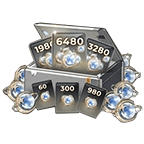
▍Common Reasons Why Wuthering Waves Top Up Fails
Network/Connection Issues
Unstable Wi-Fi, VPN conflicts, or regional network fluctuations often block the payment gateway. Official top-up sites or in-game stores are sensitive to these.
Payment Method Problems
- Cards declined by banks (international transaction blocks, insufficient funds, or region mismatches).
- Unsupported methods in your country (e.g., certain cards on mobile or specific platforms).
- PayPal loading endlessly or failing at confirmation.
Region and Account Mismatches
Play Store/App Store region not matching your payment country, or trying to top up on the wrong server/platform (PC via Epic/Steam vs. mobile/global).
Login or Browser Issues on Official Top-Up Center
Can't log in to the web-based Top-Up Center (payment.kurogame-service.com), infinite loading, or session timeouts.
Platform-Specific Glitches
- Epic Games Store: Switched payment methods may not process correctly or grant Epic rewards.
- Steam: Wallet/overlay errors.
- Mobile: Device restrictions (e.g., Huawei) or data vs. Wi-Fi conflicts.
Server-Side or Temporary Outages
Kuro Games occasionally experiences payment failures in certain regions, though these are usually fixed quickly with compensation.
First-Time Purchase Delays or Limits
Bonuses/gift packs may not display immediately; items sometimes require logging into the game to claim.
▍Step-by-Step WuWa Top Up Troubleshooting Guide
Basic Checks First:
- Restart the game, browser, or device.
- Ensure stable internet — try switching between Wi-Fi and mobile data.
- Disable VPN temporarily (or set it to a supported region like your actual location).
- Clear browser cache/cookies or try incognito mode for the official top-up site.
- Update the game and your payment app (Google Play, etc.).
Payment-Specific Fixes:
- Use PayPal if cards fail (or vice versa).
- Contact your bank to authorize international transactions.
- Verify your account region matches the payment method.
- For mobile: Try desktop browser for top-up, then claim in-game.
Advanced Steps:
- Flush DNS and reset network: On Windows, run commands like ipconfig /flushdns, netsh winsock reset.
- For Steam/Epic issues: Restart the client, verify files, or try the official web top-up center directly.
- Wait and retry later during off-peak hours if there's a server issue.
- Check official announcements or in-game mail for known payment problems.
If these don't work after multiple attempts, the process can feel frustrating and time-consuming — especially with regional restrictions or repeated failures.
A Reliable Solution: Top Up Wuthering Waves with TOPUPlive
When official channels are unreliable or unavailable in your region, TOPUPlive offers a secure and efficient alternative for Wuthering Waves top-ups. Many players turn to trusted third-party Wuthering Waves top up Center for:
- Significant discounts — often 20-30%+ off official prices (more Lunite for your money).
- UID top-up — Only your UID is need without sharing your passwword, safe and secure.
- Trustworthy site — Solid Trustpilot rating with over 900 authentic user reviews.
- Global support — works across servers and platforms where official options struggle.
60 Lunites
Hsin Guaranteed Bundle
Signature Weapon Guaranteed Bundle
All-In-One Bundle
How it works on TOPUPlive:
- Visit the Wuthering Waves page on TOPUPlive.
- Select your desired Lunite/package and server.
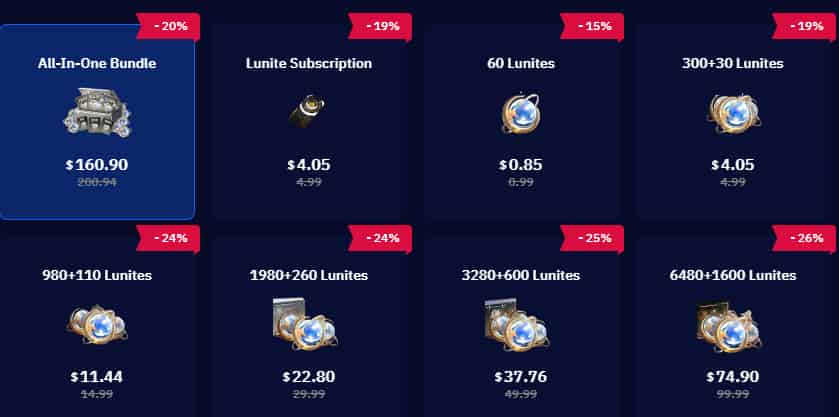
3. Provide your UID (and follow any login instructions for account recharge).
4. Complete payment securely.
5. Receive your items quickly — log into the game to claim.
TOPUPlive emphasizes account safety with secure processes and has built a strong reputation among players. It's especially useful for those facing persistent official top-up errors.
👉See also: Is TOPUPlive Legit?
Final Tips for WuWa Safe Top-Ups
- Always double-check your UID and server.
- Use official channels first when possible.
- For third-party sites, choose reputable ones with good reviews (like TOPUPlive).
- After any account login top-up, change your password for extra security.
- Keep an eye on in-game events for bonuses that pair well with top-ups.
👉Read more: Wuthering Waves Top Up Guide: How to Buy Lunite Safely & Get Maximum Value
Don't let top-up issues hold back your progress in Wuthering Waves. Try the troubleshooting steps above, and if you need a hassle-free option with great value, head over to TOPUPlive for reliable Lunite top-ups.

Lucy Lauria
Game writer
I spend most of my time exploring game worlds, testing new features, and learning how different systems work. Through my writing, I aim to share useful insights, helpful strategies, and clear guides that make games more enjoyable for everyone.


Related products


Related News

Honor of Kings Myths: Xiangliu Sima Yi and Myth: Jiaoren Dolia Skins: Release Date, Prices, and Showcase
Once Human Blueprint Guide: How to Get Weapon and Armor Blueprints
PUBG Mobile UC Event: Purchase Gifts, Rebates & TOPUPlive Deals
Aniimo Outfit & Cosmetics Guide: Character Outfits, Aniimo Skins, S1 Rewards & Lumin Crystals
VALORANT Redeem Codes (October 2026): All Codes and How to Redeem
Aniimo Tier List: Best Aniimo Ranked for DPS, Break, Heal & Support
Aniimo Beginner Guide: Starter Choice, Catching Tips, Twining & Team Building
Pokémon GO Halloween 2026 Event Guide: Part 1, Part 2, GO Pass Rewards & Pokopia Halloween Event


