



Mobile Legends Gifting Guide: How to Gift Skins & Heroes

2026-09-14 16:09:37
Gifting in Mobile Legends: Bang Bang (MLBB) is one of the best ways to surprise your squad, support a friend, or celebrate a win. Whether you want to send a cool skin, unlock a new hero for them, or just help them out with Diamonds, this complete guide covers everything you need to know in 2026.
Want to gear up yourself or buy giftable bundles? Top up Mobile Legends Bang Bang on TOPUPlive.


Weekly Elite Bundle
Monthly Epic Bundle
10x Draws Nexus Sea
Starlight Membership
Gifting Rules & Requirements in MLBB
Before you can send anything, make sure these conditions are met:
- Account level: Your account (and usually the recipient’s) must be at least Level 20.
- Friendship duration: You must be in-game friends for at least 7 days. Adding someone and trying to gift the same day will not work.
- Daily limit: You can normally send up to 3 gifts per day.
- Payment method: Only regular Diamonds work. Promo Diamonds, bonus Diamonds from events, or coupons often get rejected.
- Item availability: The skin, hero, or item must currently be available in the shop and show a Gift option. Limited, collaboration, or event skins can only be gifted while they are still on sale.
These rules help prevent abuse and keep the system fair.
What You Can Gift in Mobile Legends
You can gift a wide range of items using Diamonds:
- Skins (including many Legend skins while they are available)
- Heroes
- Starlight Pass / Starlight Card
- Weekly Diamond Pass and some other passes
- Emotes and selected event items
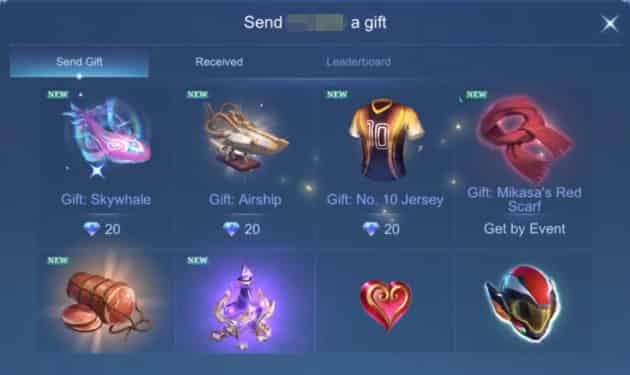
Important: You cannot gift Battle Points (BP), coins, or transfer items you already own.
How to Gift Skins (and Heroes) to Friends – Step by Step
The process for gifting skins and heroes is almost identical:
- Open Mobile Legends and go to the Shop.
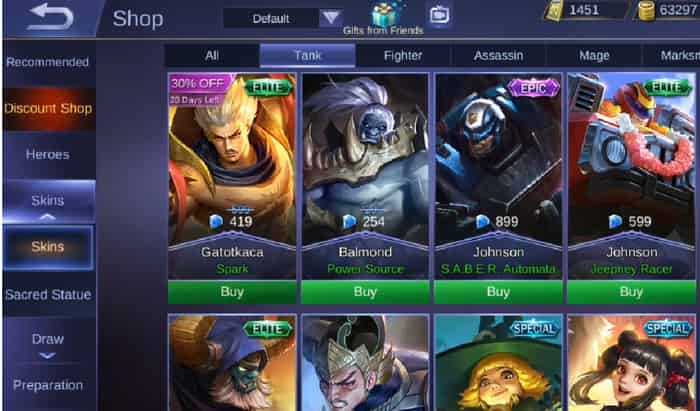
2. Tap the Gift icon (usually a gift box) at the top of the shop screen.
3. Switch to the Skins tab.
4. Search for or browse the skin you want to send.
5. Select it, then choose the Send option.
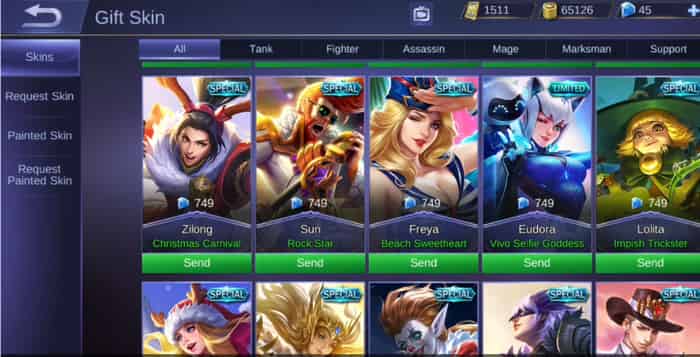
7. Pick your friend from the list (or search by IGN).
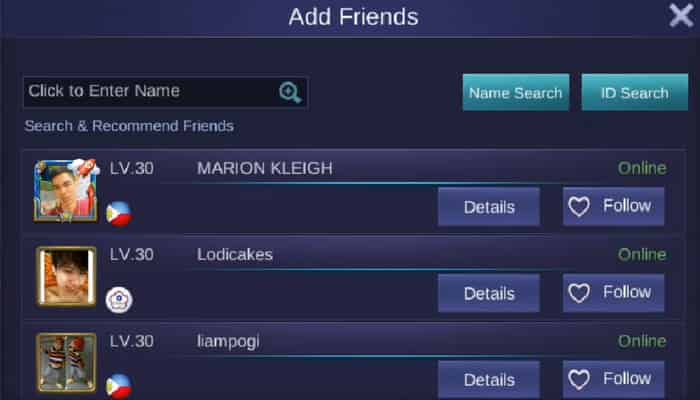
8. Double-check the recipient’s name, the item, and the Diamond cost. Confirm the purchase.
The item is sent instantly and appears in your friend’s in-game mailbox. They just need to claim it.
Pro tip: Always confirm with your friend first whether they already own the skin. If they do, the gift may convert into skin fragments instead.
How to Convert Gift to Diamonds in Mobile Legends?
You generally cannot convert a gifted skin or hero back into Diamonds. The item stays on the recipient’s account (or becomes fragments if they already own it). Livestream gifts that turn into BB Coins convert at a poor rate (roughly 5 BB Coins = 1 Diamond) and are not recommended for regular gifting.
How to Gift Diamonds to Friends (The Smart Way)
Mobile Legends does not allow direct Diamond transfers from your balance to another player.
The best and safest methods are:
1. Gift specific items in-game (as shown above)
Use your own Diamonds to buy a skin, hero, or pass for them.
2. Livestream gifts (not recommended for value)
Sending gifts during a friend’s livestream gives them BB Coins that convert poorly into Diamonds.
3. Top up Diamonds directly to your friend’s account (recommended)
Ask your friend for their User ID and Zone/Server ID. Then top up using a reliable third-party service. The Diamonds go straight into their account so they can buy whatever they want.
When you want to give flexible Diamonds instead of a specific skin, TOPUPlive is a reliable choice that offers fast, secure MLBB diamonds up to 36% off.
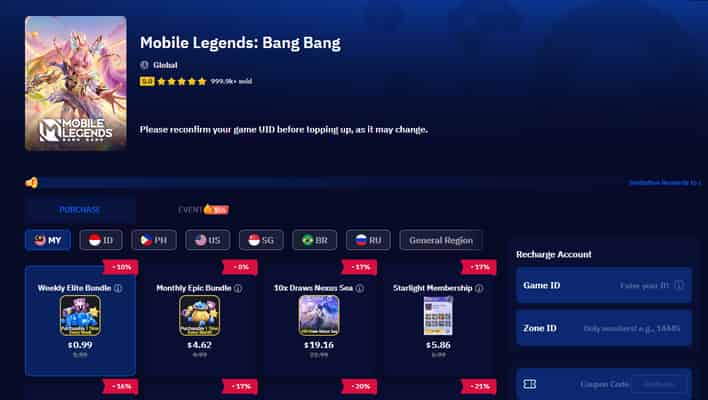
How it works:
- Get your friend’s User ID and Zone ID.
- Visit TOPUPlive MLBB page.
- Select the correct region (matching your friend’s account).
- Choose a denomination or product.
- Enter the User ID + Zone ID and complete payment.
- Diamonds usually arrive within minutes.
Popular TOPUPlive MLBB options
USD prices, discounts applied.
Product / Denomination | Original Price | TOPUPlive Price | Discount |
|---|---|---|---|
Weekly Elite Bundle | $1.09 | $0.99 | ~10% |
Weekly Diamond Pass | $2.49 | $2.07 | ~17% |
64 + 6 Diamonds | $1.49 | $1.20 | ~20% |
127 + 13 Diamonds | $2.99 | $2.38 | ~21% |
Monthly Epic Bundle | $4.99 | $4.62 | ~8% |
254 + 30 Diamonds | $5.99 | $4.65 | ~23% |
Starlight Membership | $6.99 | $5.86 | ~16% |
317 + 38 Diamonds | $7.49 | $5.86 | ~22% |
Twilight Pass | $11.99 | $10.12 | ~17% |
10x Draws Nexus Sea | $22.99 | $19.16 | ~17% |
>>Check more MLBB top up options on TOPUPlive
Weekly Elite Bundle
Monthly Epic Bundle
10x Draws Nexus Sea
Starlight Membership
👉See also: Is TOPUPlive Legit?
FAQs About MLBB Gifting
1. Can you gift Legend skins in MLBB?
Yes. Legend skins can be gifted as long as they are currently available in the shop and display the Send option.
2. Can I gift a skin without owning it first?
Yes. Gifting is treated as a brand-new purchase for the recipient. You do not need to own the skin yourself.
3. Can I give my own skins to my friends?
No. You cannot transfer or send skins (or heroes) that are already in your collection. You must buy a fresh copy specifically as a gift.
4. Can you gift coins in ML?
No. Battle Points and other coins cannot be gifted. Only Diamonds can be used to purchase giftable items.
Tips for Successful MLBB Diamond Gifting
- Start the 7-day friendship timer early if you plan to gift something special.
- Check the daily limit so you don’t hit it unexpectedly.
- Screenshot the confirmation after sending a gift or completing a top-up.
- Avoid logging into your friend’s account — it’s risky and against the rules.
- For big gifts (Legend skins or large Diamond amounts), confirm the exact item or amount with your friend first.
Conclusion
Gifting in MLBB is simple once you know the rules: meet the level and friendship requirements, buy the item as a gift through the shop, or top up MLBB Diamonds directly to your friend’s ID. Whether you’re sending a stylish skin or loading their account with Diamonds so they can choose for themselves, a little preparation makes the whole process smooth.Ready to gift? Make sure your Diamonds are topped up and go surprise your friends!
Lucy Lauria
Game writer
I spend most of my time exploring game worlds, testing new features, and learning how different systems work. Through my writing, I aim to share useful insights, helpful strategies, and clear guides that make games more enjoyable for everyone.
Related products
Related News

Best Hero Clash Top Up Centers: SEAGM, MooGold, G2G & TOPUPlive
Best Place to Buy Monopoly Go Stickers: Top Stores Compared
Valorant Top Up Guide: Cheapest VP Prices, Packages & How to Buy Instantly
ZZZ 3.3 Shiyu Defense Floor 5 Guide (Oct 30 to Nov 13): Buffs, Enemy Info&Team Comps
Free Fire Tier List: Best Characters Ranked for 2026
Arena Breakout Infinite Halloween Event 2026: Dates, Rewards, and Pumpkin Evolution Guide
Wuthering Waves Lunites Fully Explained: What It Is, Usage, Prices and More
Official Store vs TOPUPlive vs G2G vs Eneba vs Joytify: Which Wuthering Waves Top Up Center Is Better


