







Please note that this recharge service is currently only available for the A Plus Janpan International Server version. If you place an order using an account from the Southeast Asia Server, Japan/Korea Server, or Chinese Mainland Server, there may be instances where the order is successful but the recharge does not go through.
About Blue Protocol: Star Resonance
Blue Protocol: Star Resonance expands the Blue Protocol universe with a vibrant MMORPG experience. Create your own hero, team up for strategic raids, or simply relax and have fun with friends fishing, crafting, and endless exploration. Adventure awaits!
How to top-up Blue Protocol: Star Resonance Rose Gem?
- Select the Rose Gem denomination.
- Enter your UID.
- Click the "Buy Now" button and Choose your payment method.
- Once payment made, Blue Protocol: Star Resonance Rose Gem will be credited to your account shortly.
How to find Blue Protocol: Star Resonance UID?
PC Version
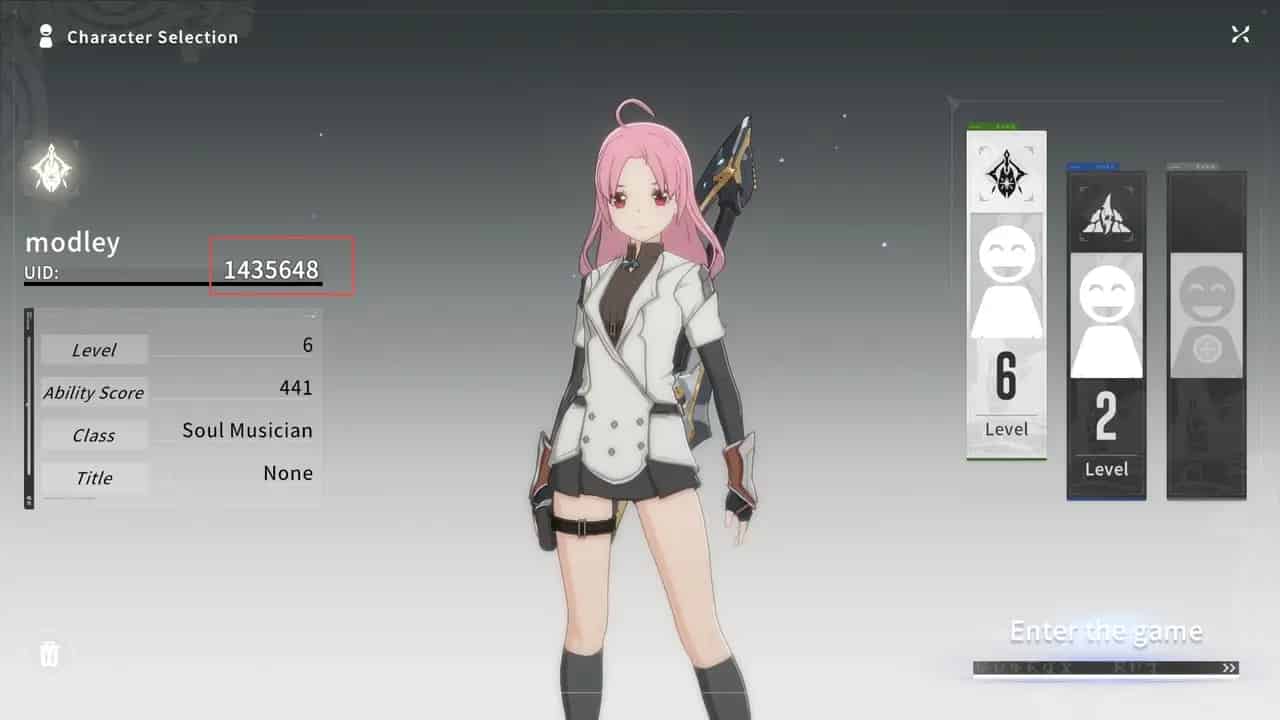
- After logging into your account, go to the character selection screen. The UID displayed on the left side is your recharge-specific character ID.
- Once in-game, your character's UID is shown directly in the bottom-left corner of the screen.
- Press 【Esc】 to open Settings, then click the fourth icon in the left sidebar to view your UID.
Mobile Version
- After logging into your account, go to the character selection screen. The UID displayed on the left side is your recharge-specific character ID.
- Tap 【Esc】 to open Settings, then select the fourth icon in the left sidebar to view your UID.