











About Asphalt 9:Legends
The most fearless drivers and become the next Asphalt Legend in this new arcade racing experience. In Asphalt 9: Legends, players will be able to take the wheel of over 50 prestigious dream cars across the most amazing real world locations. Complete hundreds of events in the solo Career mode and face up to 8 players in real time in the multiplayer mode. You can even create your own Race Club and recruit players to compete as a team to be the best in the world! Hurry up come to join us.
How to top up Asphalt 9 Legends?
- Select the Tokens you need.
- Enter your Player ID and Platform.
- Click the "Buy Now" button and Choose your payment method.
- Once payment made, your purchased will be credited to your account shortly.
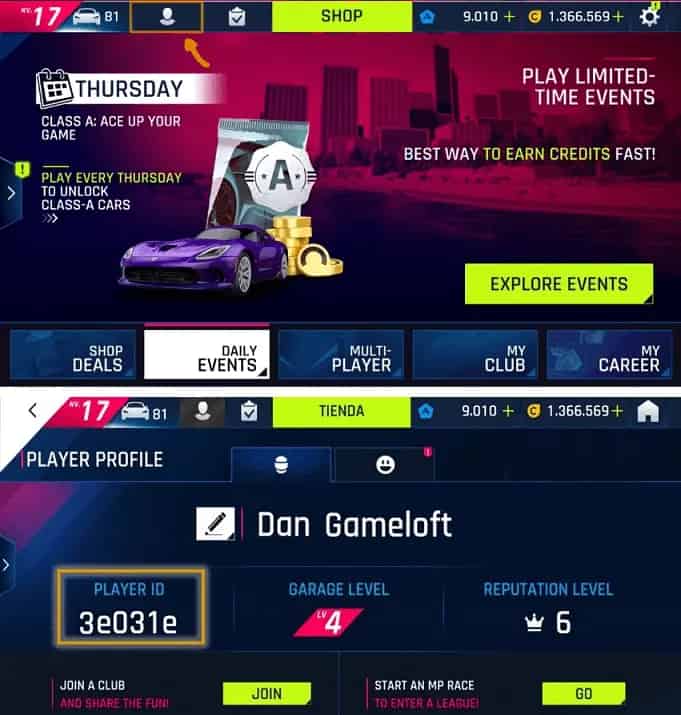
How to check Asphalt 9 ID?
- Use your account to log into the game.
- Click your upper player profile logo.
- Your Player ID will be displayed.
Q1: What are Tokens in Asphalt 9: Legends?
Tokens are the premium currency in Asphalt 9: Legends. They can be used to purchase new cars, speed up upgrades, unlock exclusive Blueprint packs, and access premium content that helps you advance faster in both solo Career mode and competitive multiplayer races.
Q2: Which platforms does this top-up service support?
TOPUPLive supports Asphalt 9: Legends top-ups across all three major platforms: iOS, Android, and Windows. When placing your order, you will need to select the platform your account is registered on to ensure correct delivery.
Q3: What Token denominations are available on TOPUPLive?
TOPUPLive offers six Token packs: 40, 105, 220, 470, 1,275, and 3,000 Tokens — with discounts ranging from 14% to 21% off standard in-game pricing. The 470-Token pack offers the highest discount at 21%.
Q4: How do I top up Asphalt 9: Legends Tokens on TOPUPLive?
Follow these steps:
1. Select the Token denomination you need.
2. Enter your Asphalt 9 Player ID and select your platform (iOS / Android / Windows).
3. Click "Buy Now" and complete the payment.
4. Tokens will be credited to your account shortly after payment is confirmed.
Q5: How do I find my Asphalt 9 Player ID?
Log in to the game using your account, then tap your player profile icon at the top of the screen. Your Player ID will be displayed on the profile page. Make sure to enter it accurately along with the correct platform selection.
Q6: Why do I need to select a platform when topping up?
Asphalt 9: Legends accounts are tied to specific platforms (iOS, Android, or Windows), and Player IDs may differ between platforms. Selecting the correct platform ensures that your Tokens are delivered to the right account.
Q7: How quickly will my Tokens arrive after payment?
Token delivery is near-instant in most cases. Once your payment is confirmed, Tokens are credited to your account within a few minutes. If there is any delay, restart the app and check your account balance.
Q8: Is it safe to top up Asphalt 9 on TOPUPLive?
Yes. TOPUPLive is PCI DSS certified with encrypted, secure payment processing. Only your Player ID and platform are required — your account password is never asked for.
Q9: What can I use Tokens for in Asphalt 9: Legends?
Tokens have a wide range of uses: unlocking new and rare cars from Blueprint packs, instantly completing car upgrades, entering special Token-gated events, and purchasing exclusive cosmetic items. They are especially valuable for competitive multiplayer and Race Club events.
Q10: What should I do if my Tokens were not delivered?
First, confirm that your Player ID and platform were entered correctly. If both were accurate and Tokens haven't arrived after a few minutes, contact TOPUPLive support via Live Chat, WhatsApp, or email at [email protected] with your order details for prompt assistance.



