











What is Junko?
Junko is a voice chat room app where you can make friends while chatting.
What are Coins in Junko?
Coins are the virtual currency of Junko — send animated gifts, unlock room privileges and premium features to make your chat experience more fun.
What denominations are available on TOPUPLive?
TOPUPLive offers Junko Coins in the following denominations: 100000 Coins / 200000 Coins / 300000 Coins / 400000 Coins / 1000000 Coins / 2000000 Coins / 5000000 Coins. Every bonus amount shown alongside each pack is included in the price you pay.
How do I top up Junko Coins on TOPUPLive?
Follow these steps:
1. Select the Coins denomination
2. Enter your UID
3. Click "Buy Now" and choose your payment method
4. Once payment is confirmed, Coins will be credited to your Junko account shortly
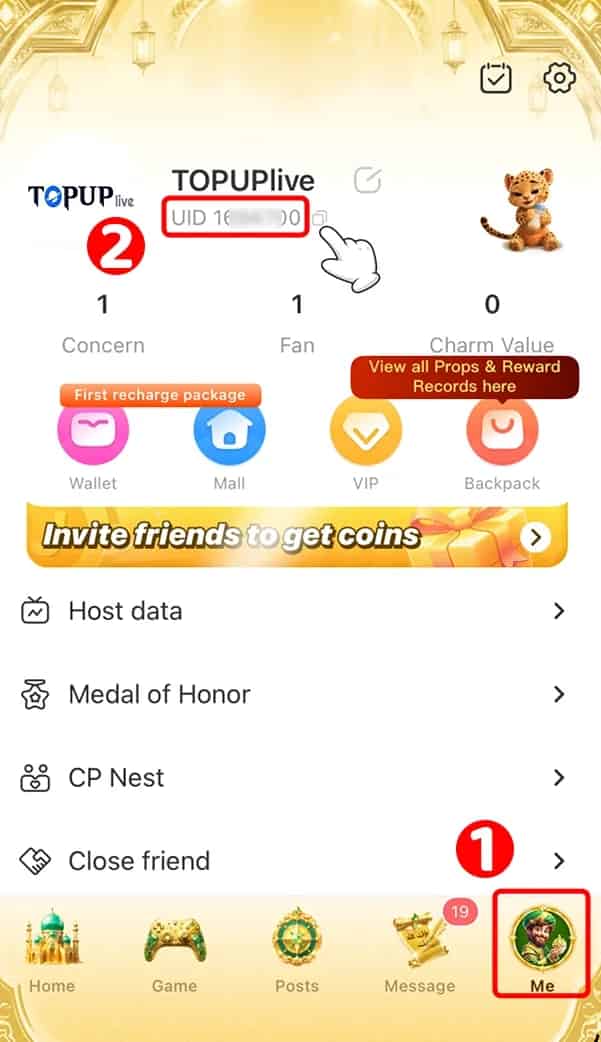
How do I find my UID?
- Log in to your Junko account.
- Tap the "Me" in the Bottom-Right corner.
- Your UID will be displayed on this page.
How quickly will my purchase be delivered after payment?
Delivery is near-instant. Once your payment is confirmed, your purchase is credited to your account within minutes. If it does not appear right away, restart the app and check your balance in your profile.
Is it safe to top up Junko on TOPUPLive?
Yes. TOPUPLive is PCI DSS certified, processes all payments through encrypted channels, and is rated 4.92/5 by 131,000+ customers. Only your UID is required — your account password is never needed.
Is this top-up service available globally?
Yes. Junko Coins top-ups on TOPUPLive are available globally — players from any region can purchase, regardless of server or device.
What payment methods can I use on TOPUPLive?
TOPUPLive supports major credit and debit cards, popular e-wallets and local payment options for your region. The full list of available methods is displayed at checkout before you pay — pick whichever is most convenient.
What should I do if my order was not delivered after payment?
First, verify that your UID was entered correctly. If everything is accurate and your purchase has not arrived after a few minutes, contact TOPUPLive customer support via Live Chat, WhatsApp, or email at [email protected] with your order number for prompt assistance.



