















What is JACO?
JACO (also known as JACO جاكو) is a general live streaming platform where creators and viewers come together to share and enjoy diverse content — from sports and gaming to music, entertainment, business, and education. Whether you are a passionate viewer or an ambitious content creator, JACO provides a space to interact, connect, and stream with ease under the philosophy of "your moments, your audience, your story."
What are JACO Coins and what are they used for?
JACO Coins — also referred to as Jaco Live Coins within the community — are the in-app currency of the JACO platform. They are used to send virtual gifts to your favorite live streamers and hosts, unlock premium interaction features, and participate in exclusive platform moments that make your experience as a viewer or supporter more impactful.
What Coin denominations are available on TOPUPLive?
TOPUPLive offers ten Coin packs: 100 / 300 / 500 / 1,000 / 2,000 / 3,000 / 5,000 / 8,000 / 10,000 / 20,000 Coins — with discounts of up to 16%. The 500, 1,000, 2,000, 3,000, and 5,000 Coin packs all carry the highest 16% discount, making them the best value options.
How do I top up JACO Coins on TOPUPLive?
Follow these simple steps:
1. Select the Coin denomination you want.
2. Enter your JACO username (without the @ symbol).
3. Click "Buy Now" and choose your preferred payment method.
4. Once payment is confirmed, Coins will be credited directly to your JACO account.
How do I find my JACO username?
Open the JACO app and go to your Profile page. Your username is displayed directly below your nickname. It typically appears with an @ symbol in front of it — when entering it on TOPUPLive, enter the username only, without the @ symbol. For example, if your profile shows @jaco_user123, enter jaco_user123.
please enter the username without '@'
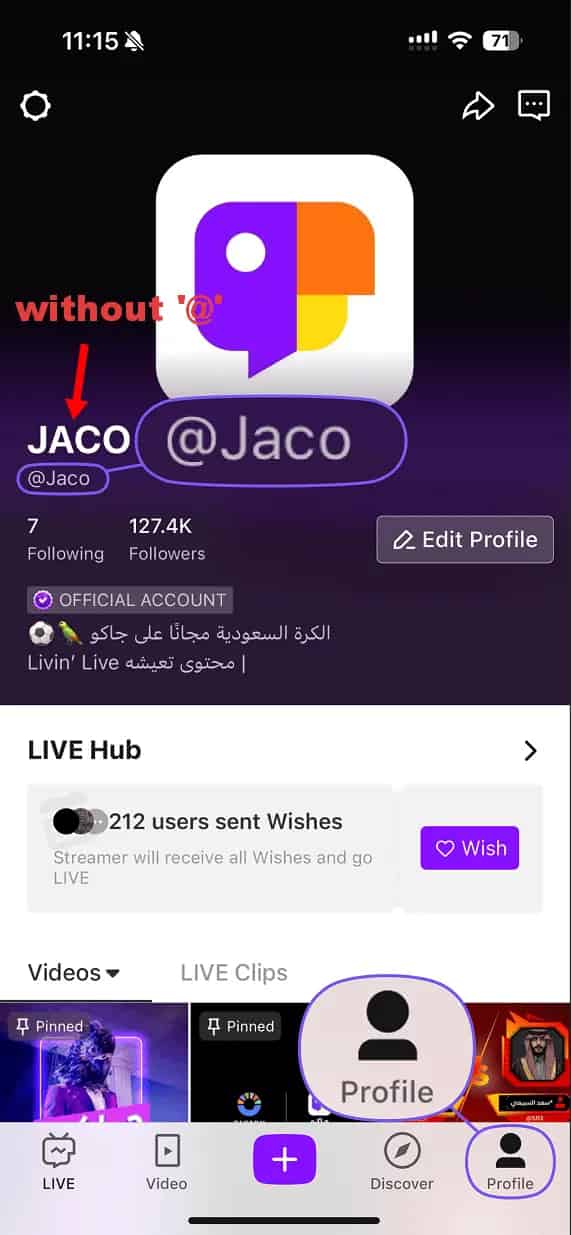
PS: Copy and paste your User ID carefully to avoid any input errors that could result in a failed or misdelivered top-up.
Why does JACO use a username instead of a numeric ID for top-up?
JACO identifies accounts by username rather than a numeric user ID, which is different from many other platforms. This means you need to provide your exact JACO username (without @) to complete a top-up. Double-check the spelling carefully — an incorrect username will result in the Coins being delivered to a different account.
How quickly will my Coins be delivered after payment?
Delivery is near-instant. Once your payment is confirmed, Coins are automatically credited to your JACO account within minutes. If they have not appeared, refresh the app and check your in-app balance.
Is it safe to top up JACO on TOPUPLive?
Yes. TOPUPLive is PCI DSS certified with fully encrypted, secure payment processing. Only your JACO username is required — your account password or login credentials are never needed.
Is this service available globally?
Yes. The JACO Coins top-up service on TOPUPLive is available to users worldwide with no regional restrictions.
What should I do if my Coins were not delivered after payment?
First, verify that your JACO username was entered correctly and without the @ symbol. If it was accurate and Coins have not arrived after a few minutes, please contact TOPUPLive customer support via Live Chat, WhatsApp, or email at [email protected] with your order number and username for prompt assistance.
What is Amar?
Amar is a social app built around effortless online connection — designed to eliminate the awkwardness of meeting new people. Start with text, transition naturally into voice chat, and move to video whenever you feel ready. Every interaction on Amar builds your social vibe in an online community where making real friends feels fun, flexible, and safe.
What are Amar Coins and what are they used for?
Coins are the in-app currency of Amar. They are used to send virtual gifts to hosts and friends during live sessions and voice room interactions, unlock premium social features, access exclusive chat room experiences, and participate in platform activities — making your social presence on Amar more expressive and engaging.
What Coin denominations are available on TOPUPLive?
TOPUPLive offers seven Coin packs: 300 / 1,000 / 3,000 / 7,000 / 14,000 / 35,000 / 100,000 Coins — with discounts of up to 39% off standard pricing. The 300, 7,000, 14,000, and 35,000 Coin packs all carry the highest 39% discount, making them the best value options.
How do I top up Amar Coins on TOPUPLive?
The process is quick and fully automatic:
1. Select the Coin denomination you want.
2. Enter your Amar User ID.
3. Click "Buy Now" and choose your preferred payment method.
4. Once payment is confirmed, Coins will be credited directly to your Amar account shortly.
How do I find my Amar User ID?
Follow these steps in the app:
1. Log in to your Amar account.
2. Tap the "Me" icon in the bottom-right corner of the screen.
3.
How quickly will my Coins be delivered after payment?
Delivery is near-instant. Once your payment is confirmed, Coins are automatically credited to your Amar account within minutes. If they have not appeared, refresh the app and check your in-app Coin balance.
Is it safe to top up Amar on TOPUPLive?
Yes. TOPUPLive is PCI DSS certified with fully encrypted, secure payment processing. Only your Amar User ID is required — your account password or login credentials are never needed.
Is this service available globally?
Yes. The Amar Coin top-up service on TOPUPLive is available to users worldwide with no regional restrictions.
Which Coin pack offers the best value?
The 300, 7,000, 14,000, and 35,000 Coin packs all carry the maximum 39% discount. For users who send gifts regularly, the 35,000 Coins pack ($30.53) provides the highest absolute saving at the top discount rate. The 300 Coins pack ($0.30) is an excellent low-cost entry point for new users who want to try the platform's gifting features first.
What should I do if my Coins were not delivered after payment?
First, verify that your Amar User ID was entered correctly. If it was accurate and Coins have not arrived after a few minutes, please contact TOPUPLive customer support via Live Chat, WhatsApp, or email at [email protected] with your order number for prompt assistance.



